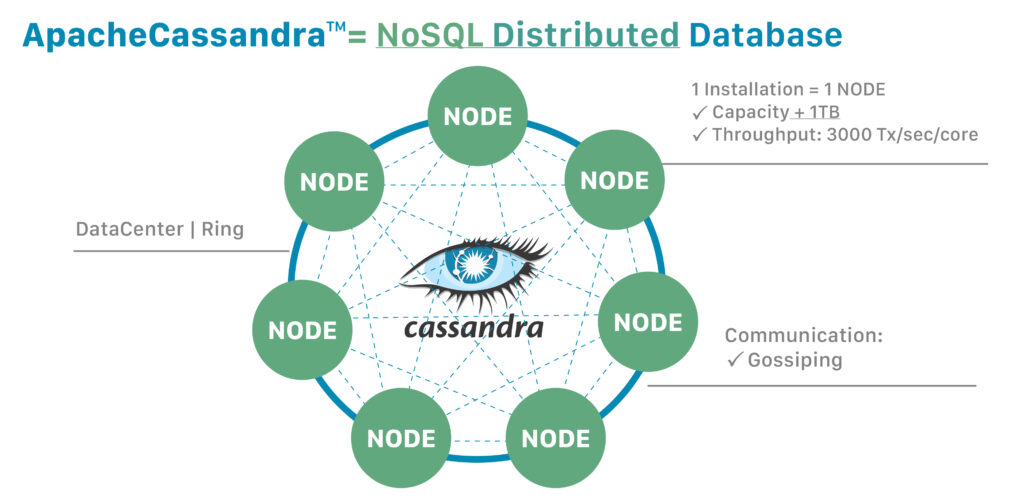
Apache Cassandra is a popular open-source distributed NoSQL database system that provides high availability and scalability. When working with Cassandra, it is common to use SQL-like query language called CQL (Cassandra Query Language) to interact with the database. This enables users to create and manage tables, insert and retrieve data, and perform various operations. In this article, we will explore how to use SQL with Apache Cassandra, including setting up a connection, querying data, and optimizing performance. By understanding the fundamentals of SQL in Cassandra, you can effectively work with this powerful database system for your data storage and retrieval needs.
Apache Cassandra is an advanced open-source NoSQL database that excels in handling large volumes of data across many commodity servers. One of the unique features of Cassandra is its support for a SQL-like query language called CQL (Cassandra Query Language). In this guide, we will explore how to effectively use SQL with Apache Cassandra, covering essential concepts, installation, basic syntax, and advanced features.
Getting Started with Apache Cassandra
Before diving into CQL, you’ll need to set up Apache Cassandra on your system. Follow these steps:
- Install Apache Cassandra: Visit the official Cassandra website to download the latest version. Follow the provided installation guides for your operating system.
- Start the Cassandra Server: Once installed, launch the Cassandra server by executing
cassandraor using the commandcassandra -ffor foreground mode. - Connect to CQL Shell: Use
cqlshto access the Cassandra Query Language shell, which allows you to execute CQL statements.
The Basics of CQL
Cassandra’s CQL syntax is similar to SQL but tailored specifically for managing Cassandra’s unique data model. Here are some basic CQL commands you’ll use regularly:
Creating a Keyspace
A keyspace in Cassandra is similar to a database in SQL. You use the following command to create a keyspace:
CREATE KEYSPACE my_keyspace WITH REPLICATION = { 'class' : 'SimpleStrategy', 'replication_factor' : 1 };In this command:
- my_keyspace: The name of your keyspace.
- SimpleStrategy: A replication strategy for distributing data. For simple use cases, this is often sufficient.
- replication_factor: Defines how many copies of data are stored across the cluster.
Creating a Table
Once your keyspace is created, you can create tables within it. Below is the syntax for creating a table:
CREATE TABLE my_keyspace.users (
    user_id UUID PRIMARY KEY,
    first_name text,
    last_name text,
    email text
);
In this command:
- my_keyspace.users: Specifies the keyspace and the table name.
- user_id: A unique identifier for each user, defined as the primary key.
- text: Specifies the type of the column.
Inserting Data
After creating your table, you can add records using the INSERT statement:
INSERT INTO my_keyspace.users (user_id, first_name, last_name, email)
VALUES (uuid(), 'John', 'Doe', 'john.doe@example.com');
You can use uuid() for generating unique user IDs automatically. Make sure to always provide values for the primary key as CQL requires a unique key for each record.
Querying Data
To retrieve data from a table, use the SELECT statement:
SELECT * FROM my_keyspace.users;This command fetches all records from the users table. You can also filter results:
SELECT first_name, last_name FROM my_keyspace.users WHERE user_id = some_uuid;Updating Data
Updating records in Cassandra is straightforward with the UPDATE statement:
UPDATE my_keyspace.users SET email = 'john.newemail@example.com' WHERE user_id = some_uuid;Deleting Data
To delete a record, use the DELETE statement:
DELETE FROM my_keyspace.users WHERE user_id = some_uuid;Understanding Data Modeling in Cassandra
While working with Cassandra, keep in mind that it employs a different data model compared to traditional SQL databases. Here are some essential tips for effective data modeling:
- Denormalization: Unlike SQL, Cassandra favors denormalized data models. Instead of using joins, you should duplicate data where necessary to reduce read latency.
- Partitioning: Choose a good partition key to ensure data is evenly distributed across nodes. This is crucial for performance and scalability.
- Clustering Columns: Use clustering columns in table definitions to determine the sort order of data within a partition.
Advanced CQL Features
Cassandra offers several advanced features that enhance its functionality. Below are some noteworthy CQL features:
Batch Statements
Use batch statements to group multiple CQL commands into a single execution, improving performance:
BATCH
    INSERT INTO my_keyspace.users (user_id, first_name, last_name, email) VALUES (uuid(), 'Alice', 'Smith', 'alice@example.com');
    INSERT INTO my_keyspace.users (user_id, first_name, last_name, email) VALUES (uuid(), 'Bob', 'Johnson', 'bob@example.com');
APPLY BATCH;
Using Indexes
In Cassandra, you can create secondary indexes on columns that are queried frequently and are not part of the primary key:
CREATE INDEX ON my_keyspace.users (email);Materialized Views
Cassandra allows you to define materialized views for automatically maintaining different representations of data:
CREATE MATERIALIZED VIEW my_keyspace.users_by_email AS
    SELECT * FROM my_keyspace.users
    WHERE email IS NOT NULL
    PRIMARY KEY (email);
Integration with Other Tools
Using Apache Cassandra with other databases or data processing tools can enhance your ecosystem. Here are some integrations to consider:
- Apache Spark: Use Spark with the Cassandra connector to perform complex analytics on your data.
- DataStax: The DataStax Enterprise edition provides additional features and a more familiar SQL interface for developers.
- Apache Kafka: Integrate Kafka for real-time data processing and streaming.
Troubleshooting Common Issues
Working with Cassandra might present some challenges. Here are several common issues and their solutions:
Connection Issues
If you encounter problems connecting to your Cassandra instance, check:
- Is Cassandra running properly?
- Are the connection settings in
cqlshcorrect?
Slow Query Performance
For slow queries, consider:
- Reviewing your queries for efficiency.
- Checking whether your data model aligns with your query patterns.
Data Consistency
If you are facing data inconsistency issues, make sure your replication settings are correctly configured and that you are aware of the consistency levels being used in your read/write operations.
Best Practices for Using CQL with Cassandra
To maximize your efficiency and performance with Apache Cassandra, follow these best practices:
- Design for queries: Structure your data model around the queries you plan to execute.
- Monitor your performance: Use monitoring tools to track the health and performance of your Cassandra nodes.
- Backup your data: Ensure regular backups, especially before making significant schema changes.
By implementing these strategies, you’ll position yourself to take full advantage of Apache Cassandra’s powerful capabilities.
Understanding how to use SQL with Apache Cassandra can greatly enhance database management and querying capabilities. By leveraging the familiarity of SQL language with the distributed architecture of Cassandra, users can efficiently handle large amounts of data and take advantage of the flexibility and scalability that Cassandra offers. With proper knowledge and implementation, SQL compatibility can streamline data operations and improve overall performance in Cassandra environments.
Related posts:
 The SELECT Statement: How to Retrieve Data from a Table
 Using WHERE to Filter Data Effectively
 How to Use ORDER BY to Sort Query Results
 The DELETE Command: Removing Records from SQL Tables
 Understanding Primary Keys and Foreign Keys
 Common Data Types in SQL Explained
 What is Database Normalization and Why is it Important?
 Table Relationships: One-to-One, One-to-Many, Many-to-Many
 Differences Between INNER JOIN, LEFT JOIN, RIGHT JOIN, and FULL JOIN
 Grouping Data with GROUP BY
 Comparison Operators: =, <>, >, <, >=, <=
 Logical Operators: AND, OR, NOT
 Subqueries: When and How to Use Them
 Correlated vs. Non-Correlated Subqueries