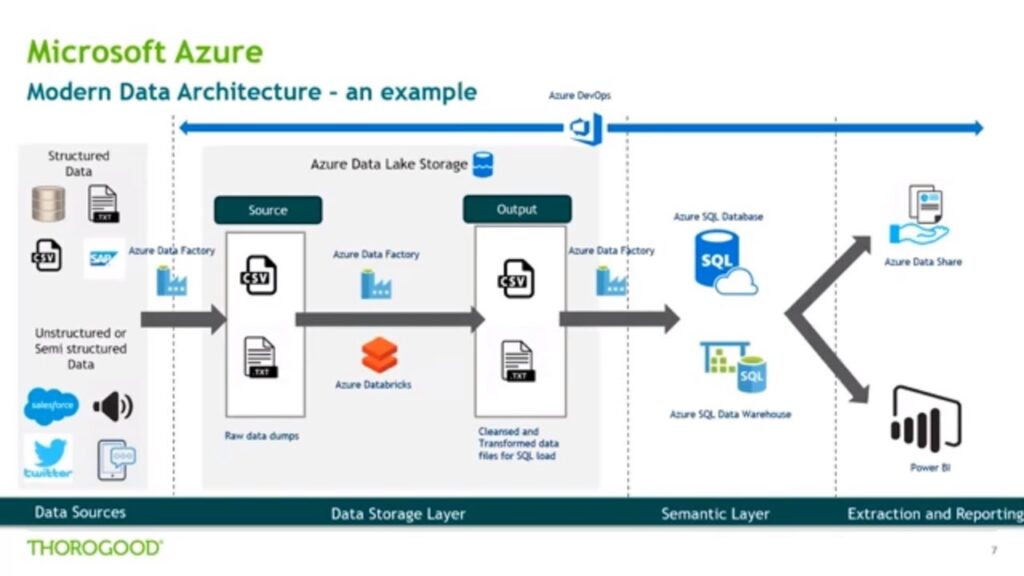
Big Data analytics has become a crucial component for organizations seeking to derive insights and make informed decisions from large and complex datasets. Microsoft Azure offers a comprehensive suite of tools and services tailored for Big Data analytics, providing scalable and efficient solutions for processing, analyzing, and visualizing vast amounts of data. In this introduction, we will explore how to harness the power of Microsoft Azure for Big Data analytics, enabling businesses to uncover valuable insights and drive data-driven decision-making.
Understanding Microsoft Azure and Its Importance in Big Data
Microsoft Azure is a comprehensive cloud computing platform that offers a range of services, including those specifically designed for big data analytics. Its ability to process vast amounts of data efficiently and its integration of machine learning capabilities make it an ideal choice for organizations looking to gain insights from massive datasets. With features such as Azure HDInsight and Azure Databricks, Azure provides robust tools that support the entire big data lifecycle from ingestion to visualization.
Setting Up Your Azure Environment
Before diving into analytics, you must first set up your Azure account and configure your environment:
- Create an Azure Account: Visit the Microsoft Azure official website and sign up for an account. You can start with a free tier that allows you to explore various features without immediate costs.
- Access the Azure Portal: Use the Azure portal to manage your services and resources. The portal provides a user-friendly interface to create and manage your big data resources.
- Select a Region: Choose a region that is closest to your target users for optimal performance. Azure operates in various geographic locations around the world.
Integrating Data Sources
Big data analytics begins with data ingestion. You need to connect various data sources to Azure:
Using Azure Data Factory
Azure Data Factory is a key service that enables you to create data integration workflows. You can:
- Connect to Multiple Data Sources: Azure Data Factory supports a wide array of connectors, allowing you to pull data from SQL databases, cloud storage, and on-premises data sources.
- Automate Data Movement: Schedule data movement jobs and set up triggers to automate the flow of data from various sources to Azure storage solutions.
- Transform Data: Use the data transformation capabilities to clean and prepare your data for further analysis.
Using Azure Blob Storage
After integrating your data sources, utilize Azure Blob Storage to store unstructured data. Blob storage is optimal for big data analytics because it:
- Allows scalability for large datasets.
- Provides high availability and redundancy.
- Supports various data formats, making it suitable for diverse data needs.
Analyzing Data in Azure
Once your data is ingested and stored, it’s time to analyze it using Azure’s powerful analytics services.
Azure HDInsight
Azure HDInsight is a cloud-based service that makes it easy to process big data using popular frameworks such as Hadoop, Spark, and Kafka. With HDInsight, you can:
- Build Apache Spark Clusters: Create scalable Spark clusters for large-scale data processing.
- Utilize Apache Hive: Write SQL-like queries over large datasets using Hive, making your data analysis more approachable.
- Stream Processing: Use Apache Kafka for real-time data ingestion and analysis.
Azure Databricks
Azure Databricks is another significant service for big data analytics that facilitates collaborative Apache Spark-based analytics. Key features include:
- Notebook Interface: An interactive interface that allows data scientists and engineers to collaborate on analytics projects seamlessly.
- Machine Learning Integration: Native support for machine learning libraries, making it easier to perform predictive analytics.
- Optimized Spark Environment: Performance optimizations that enhance the speed and efficiency of Spark jobs.
Visualizing Data with Power BI
After performing your data analyses, it’s essential to visualize the results. Azure integrates tightly with Power BI, providing powerful visualization capabilities:
- Data Connectivity: Directly connect Power BI to Azure data sources, including Azure SQL Database and Azure Blob Storage.
- Interactive Dashboards: Create interactive dashboards that help stakeholders visualize key metrics and trends in the data.
- Real-Time Insights: Leverage real-time data streaming to display dynamic updates in your dashboards.
Implementing Security Best Practices
When handling big data, security is paramount. Azure provides a range of security features to protect your data:
- Data Encryption: Ensure data at rest and in transit is encrypted using Azure’s built-in encryption technologies.
- Role-Based Access Control (RBAC): Implement RBAC to ensure that only authorized users can access sensitive data.
- Network Security: Leverage Azure Virtual Networks to create secure network boundaries for your applications.
Monitoring and Optimization
After implementing your big data analytics solutions, it’s critical to monitor performance and optimize your resources:
Using Azure Monitor
Azure Monitor helps you maximize the performance of your applications. You can use it to:
- Track Resource Usage: Monitor CPU, memory, and I/O usage to identify performance bottlenecks.
- Set Alerts: Configure alerts based on specific performance thresholds or unusual activity to proactively manage issues.
- Analyze Logs: Utilize Log Analytics to analyze logs for troubleshooting and performance optimization.
Cost Management
Effective cost management is essential for any Azure big data strategy. Use:
- Azure Cost Management Tool: Monitor and manage your expenditures to ensure your projects remain within budget.
- Optimize Resource Usage: Regularly review and adjust your resources based on usage patterns.
Best Practices for Big Data Analytics on Azure
Implementing big data solutions on Azure effectively requires adherence to best practices:
- Start Small: Begin with small scale projects to validate your approach before scaling.
- Focus on Data Governance: Establish data governance policies to ensure data quality and compliance.
- Utilize Azure Services Wisely: Leverage the right Azure services according to the needs of your project—avoid overcomplicating your architecture.
- Document Everything: Maintain thorough documentation to ensure team alignment and future project scalability.
Conclusion
Leverage the capabilities of Microsoft Azure to streamline your big data analytics projects. With its comprehensive suite of tools and services, Azure simplifies the complex landscape of big data and offers powerful solutions for organizations of all sizes.
Leveraging Microsoft Azure for Big Data analytics provides a powerful and scalable solution for organizations to effectively process, analyze, and derive valuable insights from large volumes of data. With its comprehensive suite of services and tools, Azure facilitates the handling of diverse data types, enables seamless integration with existing systems, and offers advanced analytics capabilities for decision-making. By harnessing the potential of Azure’s Big Data capabilities, organizations can drive innovation, optimize operations, and gain a competitive edge in today’s data-driven landscape.
Related posts:
 The Five Vs of Big Data: Volume, Velocity, Variety, Veracity, and Value
 Introduction to Distributed Computing in Big Data
 Understanding Data Pipelines in Big Data
 What is Apache Hadoop? A Complete Guide
 Understanding Apache Spark: Features and Use Cases
 Introduction to NoSQL Databases for Big Data
 Understanding HBase: How it Works in the Hadoop Ecosystem
 The Intersection of Big Data and Artificial Intelligence
 Natural Language Processing (NLP) with Big Data
 How Big Data is Used in Deep Learning Applications
 Sentiment Analysis with Big Data and AI
 Real-Time AI and Big Data: How It Works
 The Impact of Big Data on Financial Services and Banking
 Big Data in E-commerce: Personalization and Customer Insights