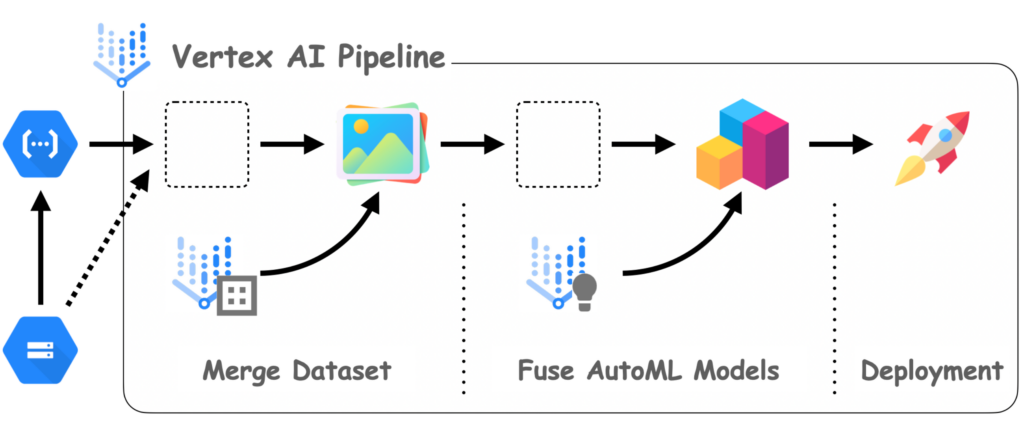
Big Data poses unique challenges when it comes to developing machine learning models at scale. With the advent of advanced technologies like Google Cloud’s Vertex AI, data scientists and engineers now have powerful tools at their disposal to tackle these challenges efficiently. In this article, we will explore how to leverage Vertex AI for building scalable machine learning models on Big Data, enabling organizations to extract valuable insights from their vast and complex data sets with ease.
Understanding Vertex AI
Vertex AI is a unified platform developed by Google Cloud that enables organizations to build, deploy, and scale machine learning (ML) models efficiently. It provides a variety of tools that streamline the ML pipeline, making it easier for data scientists and engineers to collaborate on projects involving Big Data.
Key Features of Vertex AI
Vertex AI includes several features that are essential for developing scalable ML models:
- End-to-End ML Workflows: Vertex AI offers tools for every stage of the ML lifecycle, including data preprocessing, training, tuning, and deployment.
- AutoML: This feature automates model training and hyperparameter tuning to create the best model possible without extensive manual intervention.
- Custom Models: Vertex AI allows users to build custom models to suit specific business needs or processes, facilitating more tailored approaches to Big Data challenges.
- Integration with BigQuery: Vertex AI seamlessly integrates with BigQuery, Google’s data warehouse, providing a robust solution for handling large datasets.
- Managed Services: The platform handles much of the infrastructure required to scale machine learning operations, from training to serving.
Getting Started with Vertex AI
Before utilizing Vertex AI for scalable Big Data ML models, you’ll need to set up your environment. Here’s how to get started:
1. Setting Up Google Cloud Environment
To use Vertex AI, sign up for a Google Cloud account if you don’t already have one. Google Cloud provides a Free Tier that allows users to experiment with Vertex AI features without incurring valid charges.
Next, create a new project in the Google Cloud Console and enable the Vertex AI API. Make sure to also enable the BigQuery API to access your datasets effectively.
2. Preparing Your Dataset
Large datasets can be stored in BigQuery while unstructured data may require additional preprocessing. Follow these steps to prepare your dataset:
- Data Ingestion: Upload your Big Data to Google Cloud Storage (GCS) or directly to BigQuery using the Cloud Console or the bq command-line tool.
- Data Cleaning: Organize, clean, and preprocess your data using BigQuery SQL or tools like Dataflow for ETL (Extract, Transform, Load) processes.
Building ML Models with Vertex AI
After preparing your dataset, the next step is building the ML model using Vertex AI’s capabilities.
3. Using AutoML for Automated Model Building
Vertex AI’s AutoML simplifies the process of building machine learning models. Here’s how to use it effectively:
- Navigate to the Vertex AI section in the Google Cloud Console.
- Select Datasets and import the dataset you prepared.
- Choose the type of machine learning problem (e.g., classification, regression, etc.) and let AutoML analyze your data.
Vertex AI will automatically preprocess the data, select appropriate algorithms, and perform hyperparameter tuning to create a high-performing model.
4. Custom Model Development
In cases where AutoML is not adequate, you can build a custom model. Vertex AI supports various frameworks like TensorFlow, PyTorch, and Scikit-Learn. Follow these steps:
- Set up your model training code in a Jupyter Notebook or your preferred IDE.
- Use Google Cloud Storage to manage your training data.
- Submit your training job to Vertex AI using the relevant SDKs provided by Google.
Remember to configure your training job with the necessary compute resources, such as using TPUs for faster processing of large datasets.
5. Hyperparameter Tuning
Hyperparameter tuning is an essential aspect of developing a scalable ML model. Vertex AI provides tools for automated hyperparameter tuning. To set this up:
- Define ranges for hyperparameters you want to optimize.
- Utilize Vertex AI’s tuning capabilities by specifying these parameters in your training configuration.
Deploying Your ML Model
Once you have trained and optimized your model, the next step is to deploy it for predictions.
6. Serving the Model
Vertex AI simplifies the deployment process. You can deploy your ML model as a REST API endpoint for real-time predictions or batch predictions for processing large volumes of data asynchronously. Here’s how:
- Navigate to the Models section in Vertex AI.
- Select your trained model and choose the deployment options.
- Define the machine type and scaling options required for serving the model based on expected traffic.
7. Online and Batch Predictions
When deployed, your model can serve predictions in two primary ways:
- Online Predictions: Ideal for real-time applications, such as web apps needing immediate results.
- Batch Predictions: Suitable for processing large datasets in one go, using the batch prediction feature in Vertex AI.
Monitoring and Managing Your ML Models
After deploying your models, it’s crucial to keep track of their performance using Vertex AI’s monitoring capabilities.
8. Model Evaluation
Vertex AI provides metrics to evaluate model performance, ensuring that your models achieve the desired accuracy and effectiveness. You can periodically retrain and redeploy models to maintain their relevance as data evolves.
9. Using Vertex AI Workbench for Development
Vertex AI Workbench offers a Jupyter-based solution that facilitates collaborative model development. Its features include:
- Instant Access to Tools: Direct access to Google Cloud resources, including public datasets and ML libraries.
- Notebooks for Collaboration: Share and collaborate on code in real time with team members.
Best Practices for Using Vertex AI with Big Data
To maximize the efficiency and scalability of your machine learning models on Vertex AI, consider following these best practices:
- Data Sharding: Break large datasets into manageable chunks to optimize processing and reduce latency.
- Resource Allocation: Select the appropriate compute resources based on your model size and expected load.
- CI/CD Pipelines: Implement Continuous Integration and Continuous Deployment practices to enhance collaboration and model deployments.
- Regular Monitoring: Set up ongoing monitoring to evaluate model performance and retrain when necessary.
Conclusion
Using Vertex AI for scalable Big Data ML models involves leveraging its comprehensive set of tools for model training, deployment, and monitoring. With built-in automation and strong integration capabilities, Vertex AI is well-suited to meet the challenges posed by Big Data in modern machine learning applications.
Vertex AI offers a powerful and scalable platform for developing machine learning models on Big Data. By leveraging its advanced capabilities and integrations, organizations can efficiently process, analyze, and derive insights from vast amounts of data, enabling them to drive innovation and make data-driven decisions with confidence in a highly dynamic and competitive landscape.
Related posts:
 What is Big Data? A Beginner’s Guide
 The Five Vs of Big Data: Volume, Velocity, Variety, Veracity, and Value
 Structured vs. Unstructured Data: Key Differences and Examples
 What is a Data Lake? Definition, Uses, and Benefits
 Introduction to Distributed Computing in Big Data
 Understanding Data Pipelines in Big Data
 The Evolution of Big Data Technologies: Past, Present, and Future
 Data Ingestion Techniques for Big Data Processing
 What is Apache Hadoop? A Complete Guide
 Understanding Apache Spark: Features and Use Cases
 What is Kafka? How it Powers Real-Time Big Data Applications
 Apache Flink vs. Apache Spark: Which One is Better?
 Introduction to NoSQL Databases for Big Data
 The Role of MongoDB in Big Data Analytics