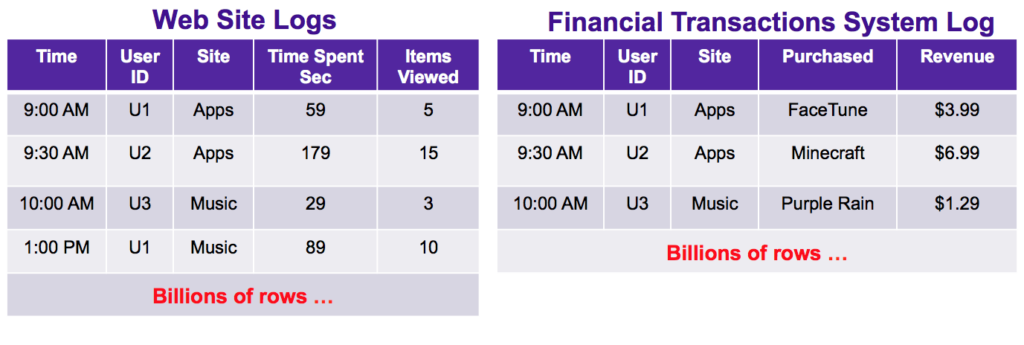
Apache DataSketches is a powerful tool for fast summarization of Big Data, allowing users to efficiently analyze and summarize large volumes of data with minimal memory usage and processing power. By leveraging advanced algorithms and data structures, DataSketches enables users to achieve accurate results while operating at scale in Big Data environments. In this article, we will explore how to effectively use Apache DataSketches to perform fast summarization of Big Data, providing insights on how organizations can leverage this tool to optimize their data analysis workflows and make informed decisions based on large data sets.
Big Data has revolutionized industries by enabling real-time analysis and decision-making. However, processing and summarizing vast datasets can often be a challenge. Fortunately, Apache DataSketches provides powerful tools for fast and efficient data summarization. This article will delve into how to effectively utilize Apache DataSketches for Big Data summarization, presenting various techniques and practical examples.
What is Apache DataSketches?
Apache DataSketches is an open-source library designed for approximate data analytics. Its primary goal is to deliver fast, memory-efficient algorithms for summarizing large datasets. By leveraging sketching techniques, DataSketches can provide insights into data volumes, distributions, and cardinalities without the overhead of traditional data processing methods.
Key Features of Apache DataSketches
- Approximate Algorithms: DataSketches utilizes probabilistic algorithms to provide approximate answers, often with a known error margin.
- Scalability: The library is designed to handle large datasets efficiently, making it ideal for Big Data environments.
- Versatility: Offers various types of sketches, including frequency sketches, quantile sketches, and set sketches.
- Interoperability: Can be integrated with various data tools and frameworks, including Hadoop, Spark, and more.
Getting Started with Apache DataSketches
To utilize Apache DataSketches, you first need to set up your environment. You can add DataSketches to your project through Maven by including the appropriate dependency:
<dependency>
    <groupId>org.apache.datasketches</groupId>
    <artifactId>datasketches-core</artifactId>
    <version>1.3.0</version>
</dependency>
Ensure that you replace the version number with the latest version available in the Maven repository.
Understanding Different Types of Sketches
Apache DataSketches provides several sketching algorithms. Here are some of the most commonly used types:
1. Count Sketch
The Count Sketch provides an estimate of the frequency of events within a dataset. This is particularly useful for applications such as clickstream analysis or monitoring user activities.
2. Quantile Sketch
The Quantile Sketch calculates approximate quantiles of streaming data, allowing you to derive median and percentile values efficiently. This is extremely beneficial in financial analytics and benchmarking.
3. Theta Sketch
A Theta Sketch efficiently estimates the cardinality of a large dataset. This is ideal for cases where you need to understand the size of unique elements, such as user IDs or transaction IDs.
Implementing DataSketches for Summarization
Let’s go through the implementation of some sketches with Apache DataSketches.
Using Count Sketch Example
import org.apache.datasketches.count.CountSketch;

public class CountSketchExample {
    public static void main(String[] args) {
        CountSketch sketch = CountSketch.builder().setK(128).build();

        // Inserting data into the sketch
        sketch.update("apple");
        sketch.update("banana");
        sketch.update("apple");

        // Estimating counts
        long appleCount = sketch.getEstimate("apple");
        long bananaCount = sketch.getEstimate("banana");

        System.out.println("Estimated count of apple: " + appleCount);
        System.out.println("Estimated count of banana: " + bananaCount);
    }
}
In this example, we create a Count Sketch and estimate the counts of different fruits. The output would provide approximate counts, demonstrating how the sketch provides a summarization of data.
Using Quantile Sketch Example
import org.apache.datasketches.quantiles.QuantileSketch;

public class QuantileSketchExample {
    public static void main(String[] args) {
        QuantileSketch sketch = QuantileSketch.builder().setK(200).build();

        // Inserting values into the sketch
        sketch.update(1.0);
        sketch.update(2.0);
        sketch.update(3.0);
        sketch.update(2.5);

        // Estimating quantiles
        double median = sketch.getQuantile(0.5);
        System.out.println("Estimated median: " + median);
    }
}
In the Quantile Sketch example, we input various values and compute the median. This showcases the ability to obtain statistical insights quickly.
Integrating DataSketches in Big Data Frameworks
One of the strengths of Apache DataSketches is its ability to integrate seamlessly with popular Big Data frameworks. Below are some methods of integration:
Using DataSketches with Apache Spark
To use DataSketches in Apache Spark, you can create UDFs (User Defined Functions) that utilize sketches for processing streamed or batch data. For instance:
import org.apache.spark.sql.api.java.UDF1;
import org.apache.datasketches.quantiles.QuantileSketch;

public class QuantileUDF implements UDF1 {
    private QuantileSketch sketch = QuantileSketch.builder().setK(200).build();

    @Override
    public Void call(Double value) {
        sketch.update(value);
        return null;
    }
}
This allows you to estimate quantiles while processing data across distributed nodes, leveraging Spark’s parallel computing capabilities.
Using DataSketches with Apache Hadoop
For Hadoop users, DataSketches can be incorporated into the MapReduce framework by updating sketches during the map phase and merging them in the reduce phase.
// Mapper
public class DataSketchMapper extends Mapper{
    private CountSketch sketch = CountSketch.builder().setK(128).build();

    public void map(LongWritable key, Text value, Context context) throws IOException, InterruptedException {
        sketch.update(value.toString());
    }
}

// Reducer
public class DataSketchReducer extends Reducer{
    public void reduce(Text key, Iterable values, Context context) throws IOException, InterruptedException {
        // Logic for merging sketches and providing final counts
    }
}
Tuning and Optimizing DataSketches
When working with Apache DataSketches, it’s essential to understand how to tune parameters for performance:
Choosing the Right Sketch Size
Each type of sketch requires specifying the size parameter K. A larger K generally reduces the error rate but increases memory usage.
Managing Data Volume and Distribution
Understanding the distribution of your data can help in selecting the appropriate sketches. For example, high-frequency events benefit from Count Sketch, while heavy-tailed distributions may perform better with Quantile Sketch.
Data Visualization with Summarized Results
Once you have summarized your data using DataSketches, the next step is to visualize the results. Integrate with libraries like Apache Superset or Tableau to create visual analytics dashboards. This enables stakeholders to grasp quick insights from large datasets without delving deeply into underlying data.
Conclusion
By employing Apache DataSketches, organizations can significantly enhance their capability to process and summarize Big Data. The efficiency and speed of sketching algorithms allow businesses to extract valuable insights quickly, fostering better decision-making and strategic planning.
Apache DataSketches offers a powerful solution for fast, accurate summarization of Big Data, enabling efficient processing and analysis of large datasets without compromising on accuracy or performance. By leveraging the capabilities of DataSketches, organizations can significantly enhance their insights and decision-making processes in the realm of Big Data analytics.
Related posts:
 What is Big Data? A Beginner’s Guide
 The Five Vs of Big Data: Volume, Velocity, Variety, Veracity, and Value
 Structured vs. Unstructured Data: Key Differences and Examples
 What is a Data Lake? Definition, Uses, and Benefits
 Introduction to Distributed Computing in Big Data
 Understanding Data Pipelines in Big Data
 The Evolution of Big Data Technologies: Past, Present, and Future
 Data Ingestion Techniques for Big Data Processing
 What is Apache Hadoop? A Complete Guide
 Understanding Apache Spark: Features and Use Cases
 What is Kafka? How it Powers Real-Time Big Data Applications
 Apache Flink vs. Apache Spark: Which One is Better?
 Introduction to NoSQL Databases for Big Data
 The Role of MongoDB in Big Data Analytics