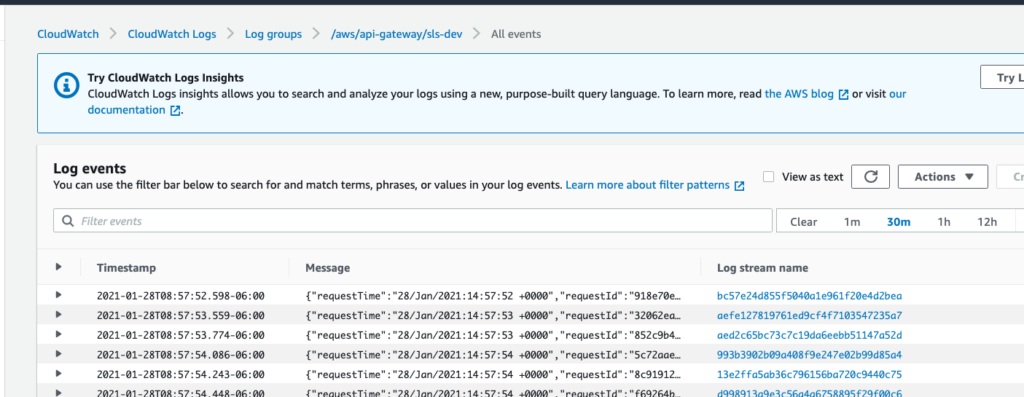
API Gateway logging is a crucial component in the realm of APIs and web services, providing valuable insights into the functioning and performance of your API endpoints. By enabling logging in your API Gateway, you can track and monitor endpoint requests, responses, errors, and other important metrics.
To use API Gateway logging effectively, you must first configure the logging settings in your API Gateway platform, such as Amazon API Gateway or Azure API Management. This typically involves selecting the desired logging format, setting up log retention policies, and integrating with logging services like Amazon CloudWatch or Azure Log Analytics.
Once logging is enabled, you can analyze the logged data to identify issues, track trends, optimize performance, and enhance security measures for your APIs. By leveraging API Gateway logging, you can make informed decisions, troubleshoot issues efficiently, and ensure the reliability and scalability of your API infrastructure.
API Gateway Logging is a crucial feature in the realm of web services and APIs. It allows developers and system admins to monitor and manage the data as it flows through an API gateway, helping in troubleshooting, performance optimization, and ensuring security. This article dives deep into what API Gateway Logging entails, its significance, how to implement it effectively, and best practices for managing logs.
Understanding API Gateway Logging
API gateways serve as intermediaries between clients and backend services. They handle various responsibilities such as request routing, composition, and protocol translation. One essential responsibility is logging. API Gateway Logging tracks requests and responses that pass through the gateway, providing valuable insights into how APIs are performing.
Logging can include different types of data, such as:
- Request and response headers
- Request and response bodies
- Status codes
- Execution time
- Client IP addresses
- Timestamps of requests
Importance of API Gateway Logging
API Gateway Logging is pivotal for several reasons:
1. Troubleshooting and Debugging
When issues arise in an API, logs provide the necessary data to pinpoint the source of the problem. With detailed logs, developers can quickly find and rectify bugs or configuration errors.
2. Performance Monitoring
API performance monitoring is integral to maintaining user satisfaction. Logging can help identify bottlenecks in the system, by monitoring execution times and response codes, enabling optimization of the API’s performance.
3. Security Auditing
Security is paramount when developing APIs. Logs can provide records of suspicious activities, allowing for quick responses to potential threats. By monitoring who accesses the API and what data they are requesting, companies can secure sensitive information.
4. Usage Analytics
Understanding how APIs are used helps in making informed decisions. Logging allows you to gather data on client requests, peak usage times, and popular endpoints, assisting in resource planning and capacity management.
How to Implement API Gateway Logging
Implementing logging in an API gateway requires careful planning and execution. Here is a comprehensive guide on how to do it:
Step 1: Choose an API Gateway Solution
Different API gateways offer various logging features. Popular options include:
- AWS API Gateway
- Azure API Management
- Google Cloud Endpoints
- Kong (Open-source)
Choose the one that fits your architecture and budget while delivering adequate logging capabilities.
Step 2: Configure Logging Settings
Once you have selected the API gateway, the next step is configuring the logging settings:
- Enable logging in the API gateway settings.
- Define the log levels (e.g., error, info, debug).
- Select the components to log (requests, responses, errors, etc.).
- Specify destinations for logs, such as cloud storage, dedicated logging services (like AWS CloudWatch, ELK stack), or local files.
Step 3: Use Structured Logging
Structured logging involves logging information in a consistent, machine-readable format (like JSON). This enables parsing and searching through logs easily:
- Ensure your logs contain structured data for better analysis.
- Include relevant metadata such as request ID, user ID, and service name.
Step 4: Implement Log Rotation
Over time, logs can accumulate quickly, consuming storage space. Set up log rotation to manage this effectively:
- Define a retention policy (e.g., keep logs for 30 days).
- Automate archiving and deletion of older logs to manage storage costs.
Step 5: Create Alerts and Dashboards
Real-time monitoring is vital. Set up alerts for unusual activities or performance degradation:
- Integrate with monitoring tools such as Datadog, Splunk, or Prometheus.
- Establish dashboards that visualize logs to quickly analyze API health and performance.
Best Practices for Managing API Gateway Logs
Once logging is in place, managing those logs effectively is equally important. Here are some best practices:
1. Minimize Sensitive Data in Logs
Be cautious about logging sensitive information, such as passwords, credit card numbers, and personal data. Use masking techniques to safeguard sensitive information in the logs.
2. Optimize Log Volume
Excessive logging can lead to performance issues. Maintain a balance between what to log and what’s necessary for troubleshooting and analysis. Use log levels to control the amount of data being logged.
3. Regularly Review Logs
Establish a process for regularly reviewing logs. This practice can reveal trends over time, helping to detect and mitigate recurring issues.
4. Implement Log Retention Policy
Define how long you need to keep logs based on your business and compliance requirements. Adhere to best practices in data management by setting a log retention policy to delete logs periodically.
5. Ensure Compliance with Regulations
Depending on the industry, there may be regulations surrounding data logging, such as GDPR, HIPAA, or PCI DSS. Make sure your logging practices comply with regulatory standards to avoid potential fines or legal issues.
Tools for API Gateway Logging
Here are several popular tools that can enhance your logging capabilities:
- ELK Stack (Elasticsearch, Logstash, Kibana): Provides a powerful solution for log storage and visualization.
- Splunk: Known for its ability to analyze logs at scale and create actionable insights.
- Grafana: Typically used for metrics and can also visualize log data when integrated with other tools.
- Papertrail: A great solution for aggregating logs from multiple sources for easy searching and management.
Case Studies: Successful API Gateway Logging Implementation
Seeing API Gateway Logging in action can provide invaluable insights. Consider these examples:
Case Study 1: E-Commerce Platform
An e-commerce company implemented API Gateway Logging to monitor payment gateway interactions. By analyzing logs, they discovered a spike in failed transactions during peak hours. The insights led to system optimizations that improved transaction success rates by 25%.
Case Study 2: Social Media Application
A social media application utilized API Gateway Logging to track user engagement and content trends. The logging data revealed preferred posting times and popular content types, leading to more targeted marketing strategies and a 40% increase in user engagement.
Conclusion
Implementing API Gateway Logging can significantly bolster the performance, security, and usability of your APIs. By understanding the fundamentals of logging, employing best practices, and using advanced monitoring tools, organizations can achieve greater efficiency and user satisfaction.
API Gateway logging is a crucial tool for monitoring the performance, security, and overall health of APIs. By enabling detailed logging, developers can troubleshoot issues, track usage patterns, and ensure compliance with regulatory requirements. Leveraging API Gateway logging effectively involves configuring logging levels, integrating with monitoring tools, and analyzing logs to optimize API performance and enhance overall user experience.
Related posts:
 What Are APIs and How Do They Work?
 How to Secure Your API with JWT
 Building a Microservices Architecture with APIs
What Are API Keys and How to Use Them Securely?
Building a Microservices Architecture with APIs
What Are API Keys and How to Use Them Securely?
 A Beginner’s Guide to API Monetization
 Using Google Maps API for Location-Based Applications
 How to Handle API Authentication in Mobile Apps
The Importance of API Caching and How to Implement It
How to Handle API Authentication in Mobile Apps
The Importance of API Caching and How to Implement It
 Building a Weather App Using OpenWeather API
 How to Use AI-Powered APIs for Your Applications
 API Gateway vs Load Balancer: Understanding the Differences
How to Set Up API Rate Limiting in Nginx
API Gateway vs Load Balancer: Understanding the Differences
How to Set Up API Rate Limiting in Nginx
 How to Optimize API Response Time for Better Performance
Best API Security Practices to Prevent Attacks
How to Optimize API Response Time for Better Performance
Best API Security Practices to Prevent Attacks