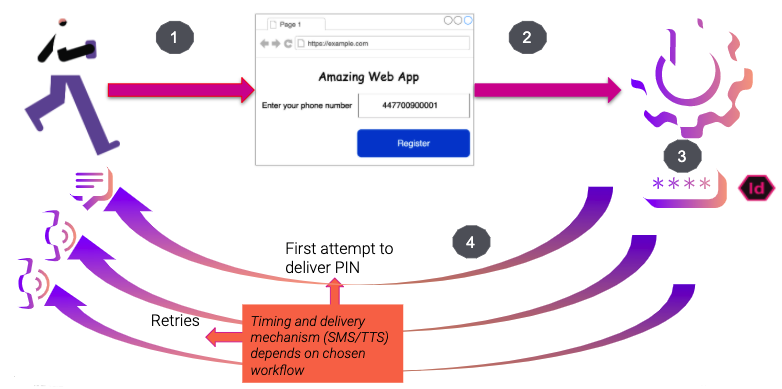
Implementing Two-Factor Authentication (2FA) in an API is a crucial security measure to enhance user authentication and protect sensitive data in web services. By incorporating 2FA, API endpoints can verify the identity of users through two different factors – typically something they know (like a password) and something they have (like a mobile device). This adds an extra layer of security beyond just traditional password authentication, making it significantly harder for unauthorized users to gain access to the API. In this guide, we will explore the key considerations and best practices for implementing 2FA in an API, ultimately helping to improve the overall security of your web services.
In the ever-evolving landscape of digital security, Two-Factor Authentication (2FA) has become a critical component for protecting sensitive user data, especially in APIs and web services. In this comprehensive guide, we will discuss the importance of 2FA, the different methods to implement it, and a step-by-step approach to integrating 2FA into your API.
Why Use Two-Factor Authentication?
Two-Factor Authentication adds an additional layer of security to the standard username and password combination, ensuring that only authorized users can access sensitive information. Traditional methods of authentication are susceptible to hacking methods, such as phishing and brute-force attacks. By implementing 2FA, even if a hacker gains access to a user’s password, they will still require a second form of verification.
Common 2FA Methods
Before diving into the implementation steps, it’s essential to understand the common methods of 2FA:
- SMS-based Verification: A one-time code is sent to the user’s mobile device via SMS.
- Email Verification: A unique link or code is sent to the user’s registered email address.
- Authenticator Apps: Third-party apps like Google Authenticator or Authy generate time-sensitive codes.
- Hardware Tokens: Physical devices that generate secure codes for authentication.
- Push Notifications: Notifications are sent to the user’s device for quick approval.
Key Considerations Before Implementation
Before starting the implementation, consider the following factors:
- User Experience: Ensure that the method chosen does not frustrate users while providing security.
- Compliance: Ensure that your implementation meets regional regulations and industry standards.
- Backup Codes: Implement a method for users to regain access if they lose their 2FA device.
Step-by-Step Guide to Implementing 2FA in an API
Step 1: Select an Authentication Framework
Choose a robust authentication framework that supports 2FA. Popular frameworks include:
- OAuth 2.0: Common for APIs, allowing for secure access delegation.
- Passport.js: A middleware for Node.js that supports various authentication strategies.
- Spring Security: A powerful security framework for Java applications.
Step 2: User Registration for 2FA
During the user registration process, allow users to opt into 2FA. You can implement a simple UI form that asks:
- If they wish to enable 2FA.
- Which method of 2FA they prefer (SMS, Authenticator app, etc.).
Store their preference securely in the database, ensuring you comply with data protection regulations.
Step 3: Generate and Store 2FA Secrets
For methods that require a shared secret, such as authenticator apps, generate a unique secret key when 2FA is enabled. To do this:
const speakeasy = require('speakeasy');
const secret = speakeasy.generateSecret({ length: 20 });
This unique secret must be securely associated with the user’s account in your database and should be encrypted.
Step 4: Sending 2FA Codes
Depending on the chosen method, implement the logic to send verification codes:
- SMS: Integrate with services like Twilio or Nexmo to send SMS codes.
- Email: Use SMTP libraries or services like SendGrid or Mailgun for sending codes.
- Authenticator App: Display a QR code for users to scan with their authenticator app:
const QRCode = require('qrcode');
QRCode.toDataURL(secret.otpauth, (err, dataUrl) => {
  // Send dataUrl as an image to the frontend
});
Step 5: Verifying 2FA Codes
Create an endpoint to verify the 2FA code entered by the user:
app.post('/verify-2fa', (req, res) => {
  const { userCode, userId } = req.body;
  const verified = speakeasy.totp.verify({
    secret: userSecret,
    encoding: 'base32',
    token: userCode
  });

  if (verified) {
    // Successful verification
  } else {
    // Failed verification
  }
});
Step 6: Implementing Backup Codes
Provide users with backup codes generated during the 2FA setup. This allows users access to their accounts if they lose their primary 2FA method:
const backupCodes = [...Array(10)].map(() => Math.random().toString(36).substring(2, 8));
Store these codes securely and encourage users to keep them in a safe place.
Step 7: User Experience Design
Notify users about the 2FA requirements and ensure that the process is seamless:
- Provide clear instructions at every step.
- Make error messages informative.
- Allow users an easy way to disable 2FA if needed.
Step 8: Testing and Monitoring
Once your 2FA implementation is in place, thorough testing is essential:
- Test multiple scenarios (correct codes, expired codes, etc.).
- Monitor user feedback to identify any frustrating points in the flow.
Step 9: Documentation and Support
Provide comprehensive documentation for your users on how to enable, use, and troubleshoot 2FA. Tailored support can help users feel more secure and informed about their accounts.
Conclusion
Implementing Two-Factor Authentication in your API enhances security significantly, making it a best practice in the world of API and web service development. Following this step-by-step guide will allow you to integrate 2FA effectively and contribute to safer online experiences for your users.
Implementing Two-Factor Authentication (2FA) in an API is a crucial security measure to enhance the protection of user data and prevent unauthorized access. By integrating 2FA into API authentication mechanisms, developers can bolster the security of their web services and mitigate the risk of potential cyber threats. This additional layer of verification adds an extra level of security, ensuring that only authorized users can access sensitive information, thereby enhancing overall API security.
Related posts:
 What Are APIs and How Do They Work?
 How to Secure Your API with JWT
 Building a Microservices Architecture with APIs
What Are API Keys and How to Use Them Securely?
Building a Microservices Architecture with APIs
What Are API Keys and How to Use Them Securely?
 A Beginner’s Guide to API Monetization
 Using Google Maps API for Location-Based Applications
 How to Handle API Authentication in Mobile Apps
The Importance of API Caching and How to Implement It
How to Handle API Authentication in Mobile Apps
The Importance of API Caching and How to Implement It
 Building a Weather App Using OpenWeather API
 How to Use AI-Powered APIs for Your Applications
 API Gateway vs Load Balancer: Understanding the Differences
How to Set Up API Rate Limiting in Nginx
API Gateway vs Load Balancer: Understanding the Differences
How to Set Up API Rate Limiting in Nginx
 How to Optimize API Response Time for Better Performance
Best API Security Practices to Prevent Attacks
How to Optimize API Response Time for Better Performance
Best API Security Practices to Prevent Attacks