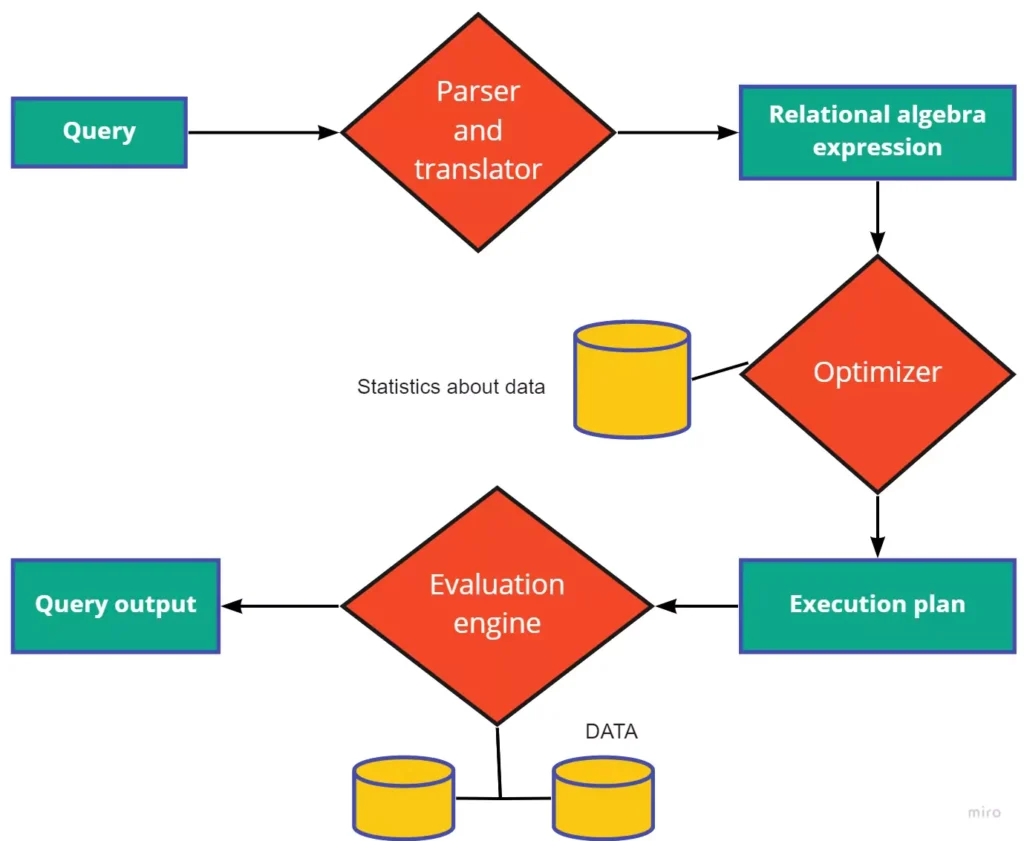
In the realm of Big Data processing, optimizing SQL queries is crucial to ensure efficiency and scalability. With massive volumes of data being generated and analyzed, poorly optimized queries can lead to sluggish performance and decreased throughput. By strategically fine-tuning SQL queries tailored for Big Data environments, organizations can unlock the full potential of their data processing capabilities and expedite insights extraction. This article delves into key strategies and best practices for optimizing SQL queries for Big Data processing, empowering businesses to harness the power of their data effectively.
Understanding the Importance of SQL Optimization
In the realm of big data, the sheer volume of data can lead to slow query performance, which can significantly affect data analytics and application responsiveness. Optimizing SQL queries allows organizations to extract insights faster and more efficiently. Whether you are using traditional RDBMS or modern distributed SQL databases, understanding how to structure your queries efficiently is crucial.
Analyze and Understand Your Data
Before diving into optimization techniques, it’s essential to analyze the data you’re working with. Understand the schema, data types, and distribution. This foundational knowledge aids in crafting effective SQL queries.
- Inspect Data Distribution: Examine how data is distributed across tables.
- Identify Hotspots: Find frequent access patterns that can inform your query optimization.
Use Efficient Data Models
The underlying data model can greatly affect query performance. Consider the following:
- Normalization: Avoid data redundancy by normalizing your database. However, excessive normalization can lead to complex joins, impacting performance.
- Denormalization: In some cases, denormalizing the database can improve the performance of read-heavy applications by reducing the number of joins.
Indexing for Performance
Creating the right indexes is one of the most critical steps in optimizing SQL queries. A well-placed index can dramatically increase the speed of data retrieval. Here are some tips:
- Clustered Indexes: Choose a primary key wisely. A clustered index sorts data in the table based on the index key.
- Non-Clustered Indexes: Use non-clustered indexes for frequently queried columns to speed up searches without rearranging the actual data.
- B-Tree Indexes: Ensure that B-tree indexes are built for large datasets to enhance retrieval times.
- Composite Indexes: Create composite indexes for queries that filter on multiple columns.
Avoid SELECT *
Using SELECT * retrieves all columns, leading to unnecessary data processing and network overhead. Instead, specify only the columns you need:
SELECT column1, column2 FROM table WHERE condition;Limit Your Data
When executing queries on large datasets, always try to impose limits. Use the LIMIT clause to restrict the number of rows returned:
SELECT column1, column2 FROM table WHERE condition LIMIT 100;Optimize JOINs
JOIN operations can be slow, particularly when working with large datasets. Here are some strategies:
- Minimize the Number of JOINS: Combine tables in a necessary manner only. Aim to use fewer joins where possible.
- Use INNER JOINs: Prefer INNER JOINs over OUTER JOINS when conditions permit; they are typically faster.
- JOIN on Indexed Columns: Always join on indexed columns to improve performance.
- Filter Before Join: Apply filters before joins to reduce the amount of data involved in the join operation.
Utilize Aggregate Functions Wisely
When working with large datasets, aggregate functions can impact performance. Here’s how to use them wisely:
- Use GROUP BY Efficiently: Specify only the necessary columns. Using too many columns can slow down performance.
- Leverage Subqueries: Use subqueries effectively to filter data before aggregation.
- Consider Window Functions: Window functions may perform better than GROUP BY in some analytical scenarios.
Proper Use of Temporary Tables
Temporary tables can be a boon for managing complex queries. Here are some best practices:
- Store Intermediate Results: Break complex queries into smaller parts by storing intermediate results in temporary tables.
- Index Temporary Tables: Just because they’re temporary doesn’t mean they don’t benefit from indexing.
- Clean Up: Ensure you clean up temporary tables to avoid unnecessary clutter.
Optimize Query Execution Plans
Understanding how your SQL queries are executed helps in identifying bottlenecks. Use tools like EXPLAIN to review and analyze:
- Identify Slow Operations: Look for full table scans and other high-cost operations.
- Monitor Index Usage: Ensure that indexes are being used effectively in your queries.
Consider Partitioning Tables
Partitioning can significantly enhance performance by dividing a large table into smaller, more manageable pieces:
- Range Partitioning: Divide tables based on value ranges.
- List Partitioning: Use list partitioning for datasets with well-defined categories.
- Hash Partitioning: Implement hash partitioning to distribute data evenly across partitions.
Optimize Data Retrieval Techniques
How you retrieve data can significantly influence performance:
- Batch Processing: Instead of processing rows one at a time, batch process for efficiency.
- Asynchronous Queries: If supported, use asynchronous queries for better performance in applications.
Utilize Caching Efficiently
Caching can drastically reduce query times. Consider the following:
- Query Caching: Use query caching at various levels, such as application or database caches.
- Result Caching: Cache the results of long-running queries to minimize repeated access to large datasets.
Monitor System Performance
Regularly monitoring your database performance helps in proactive optimization:
- Use Monitoring Tools: Leverage tools to monitor system performance and query execution times.
- Analyze Logs: Review logs for slow queries and performance bottlenecks.
Leverage Distributed Processing Technologies
When scaling, consider distributed SQL processing technologies like Apache Spark or Google BigQuery to handle large datasets:
- MapReduce: Use MapReduce techniques to distribute and process data across multiple nodes.
- Columnar Storage: Explore columnar storage for analytical queries, optimizing read performance.
Educate Your Team
Finally, invest in educating your development and data teams on best practices in SQL optimization for big data:
- Regular Training: Conduct training sessions to keep everyone abreast of the latest trends and techniques.
- Code Review Practices: Implement a code review process that includes checks for SQL performance considerations.
Optimizing SQL queries for Big Data processing is essential for improving performance, scalability, and efficiency in handling large datasets. By applying best practices such as indexing, partitioning, and minimizing data transfer, organizations can maximize the speed and effectiveness of their Big Data operations. Continuous monitoring and fine-tuning of SQL queries are crucial to ensure optimal performance in the ever-evolving landscape of Big Data processing.
Related posts:
 The Five Vs of Big Data: Volume, Velocity, Variety, Veracity, and Value
 Introduction to Distributed Computing in Big Data
 Understanding Data Pipelines in Big Data
 What is Apache Hadoop? A Complete Guide
 Understanding Apache Spark: Features and Use Cases
 Introduction to NoSQL Databases for Big Data
 Understanding HBase: How it Works in the Hadoop Ecosystem
 The Intersection of Big Data and Artificial Intelligence
 How Big Data Powers Machine Learning Models
 Natural Language Processing (NLP) with Big Data
 How Big Data is Used in Deep Learning Applications
 Sentiment Analysis with Big Data and AI
 Real-Time AI and Big Data: How It Works
 The Impact of Big Data on Financial Services and Banking