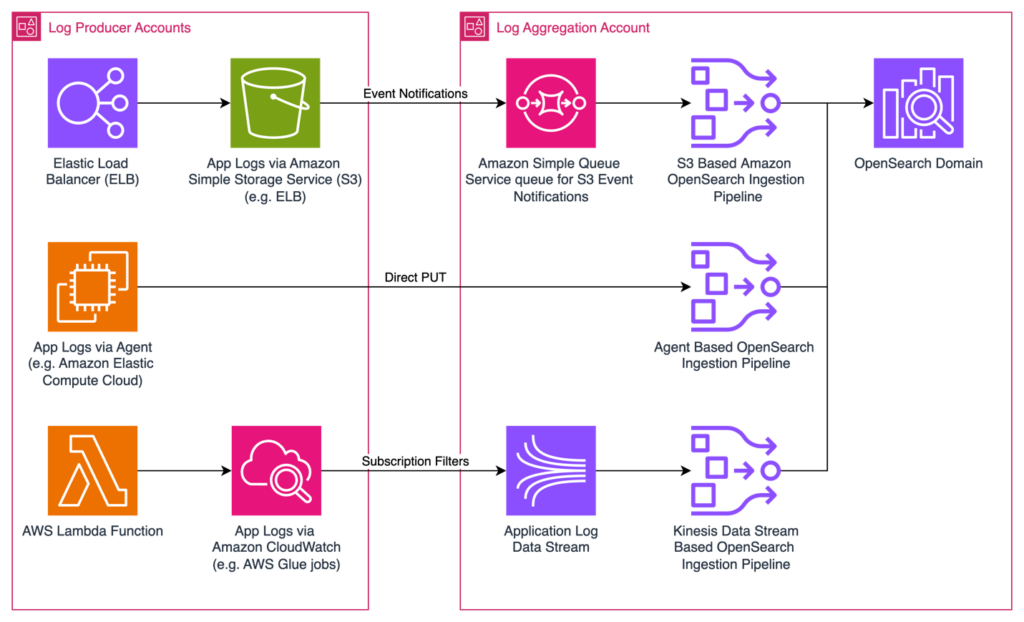
Amazon Kinesis is a powerful real-time data streaming service provided by Amazon Web Services (AWS) that enables organizations to efficiently collect, process, and analyze vast amounts of data in real time. It is a crucial tool in the realm of Big Data, allowing businesses to handle massive streams of information from various sources to gain valuable insights and make data-driven decisions quickly. In this introduction, we will explore how organizations can leverage Amazon Kinesis to harness the power of real-time Big Data streaming for optimizing operations, enhancing customer experiences, and gaining a competitive edge in today’s data-driven landscape.
In the realm of Big Data, processing and analyzing data in real-time has become incredibly vital for businesses aiming to gain insights promptly. Amazon Kinesis is a powerful platform designed to facilitate real-time data streaming, allowing organizations to handle vast quantities of data efficiently. This article will delve into the various components of Amazon Kinesis, demonstrate how to set it up, and explore key use cases, advantages, and best practices.
Understanding Amazon Kinesis
Amazon Kinesis is a suite of services offered by AWS that enables the collection, processing, and analysis of real-time streaming data. The primary components of Kinesis include:
- Amazon Kinesis Data Streams: Used for building custom, real-time applications that process or analyze streaming data.
- Amazon Kinesis Data Firehose: Enables users to easily load streaming data into data lakes, data stores, and analytics services.
- Amazon Kinesis Data Analytics: Allows you to analyze streaming data in real-time using standard SQL queries.
- Amazon Kinesis Video Streams: Facilitates the streaming of video and associated metadata for machine learning applications.
Setting Up Amazon Kinesis Data Streams
To get started with Amazon Kinesis, follow these steps:
Step 1: Create a Kinesis Data Stream
1. Log in to your AWS Management Console.
2. Navigate to the Kinesis service.
3. Select “Create data stream.”
4. Specify a stream name and the number of shards. Shards define your stream’s capacity (each shard can handle up to 1 MB of data per second).
5. Click on “Create data stream.”
Step 2: Send Data to the Kinesis Data Stream
There are several methods to send data to Kinesis:
- Using the AWS SDKs: Integrate Kinesis into your applications.
- Utilizing Kinesis Producer Library (KPL): Enable efficient data insertion.
- Employing AWS CLI or REST API: For manual data sending.
Here’s a sample code snippet using AWS SDK for Python (Boto3):
import boto3

# Initialize Kinesis client
kinesis = boto3.client('kinesis')

# Send data to the Kinesis Data Stream
response = kinesis.put_record(
    StreamName='YOUR_STREAM_NAME',
    Data='YOUR_DATA_PAYLOAD',
    PartitionKey='YOUR_PARTITION_KEY'
)
Step 3: Processing Data with Kinesis Data Analytics
1. Navigate back to the Kinesis service in the AWS Management Console.
2. Choose “Data Analytics” and click on “Create application.”
3. Define your application’s information, including the application name and the source data stream.
4. Write SQL queries to process the incoming stream.
5. You can set the output to another stream, an AWS S3 bucket, or even a Lambda function for further processing.
Step 4: Loading Data with Kinesis Data Firehose
1. Go to the Kinesis console and select “Firehose.”
2. Click on “Create delivery stream.”
3. Choose the source, which can be a Kinesis stream, Direct PUT, or a Lambda function.
4. Specify the destination, such as S3, Redshift, or Elasticsearch, and configure buffering and transformation options.
5. Finish by reviewing and creating the delivery stream.
Common Use Cases for Amazon Kinesis
Organizations can leverage Kinesis for various real-time analytics and stream processing applications:
1. Log and Event Data Collection
With Kinesis, businesses can collect logs from different sources like servers, applications, and IoT devices in real-time. This helps detect anomalies, perform aggregation, and monitor system performance continuously.
2. Real-Time Analytics and Monitoring
Kinesis allows real-time data analytics that can inform operational improvements. Companies in finance can monitor transactions instantaneously to identify fraud patterns, while e-commerce sites can analyze user behavior for better marketing strategies.
3. Machine Learning with Streaming Data
Integrating Kinesis with AWS Machine Learning services can enhance the predictive capabilities of businesses. Stream processing can yield continuous insights that influence decision-making significantly, like predicting customer churn in retail.
The Benefits of Using Amazon Kinesis
Amazon Kinesis offers numerous advantages for businesses:
- Scalability: Automatically scales to match your data throughput with no downtime.
- Durability: Guarantees durability with multiple data replication within the AWS regions.
- Complex Event Processing: Provides capabilities for filtering, enriching, and aggregating data streams.
- Integration with AWS Services: Seamlessly integrates with AWS offerings like Lambda, Redshift, S3, and more.
Best Practices for Amazon Kinesis
To maximize the effectiveness of Amazon Kinesis, consider the following best practices:
1. Optimize Shard Count
Monitor the incoming data rate and adjust the shard count accordingly. Too few shards may lead to throttled requests, while too many may incur unnecessary costs.
2. Use Kinesis Data Firehose for Ease of Data Loading
Utilize Kinesis Data Firehose for smoothly loading streaming data into S3 or data lakes. It abstracts much of the complexity involved while ensuring data is batched and automatically managed.
3. Monitor and Metrics
Utilize CloudWatch to monitor your Kinesis streams. Set up alerts for important metrics like read and write throughput, errors, and latency.
4. Handle Data Retention Wisely
Configure data retention periods according to your specific use case. By default, Kinesis retains data for 24 hours, with the option to extend it up to 7 days.
5. Implement Error Handling
Incorporate effective error handling and retry strategies to ensure smooth streaming processes. Make use of dead-letter queues for handling unprocessed records.
Conclusion
Amazon Kinesis is a robust solution for businesses aiming to harness real-time big data streaming. By understanding its various components, properly setting it up, and following best practices, organizations can unlock valuable insights from their streaming data and stay ahead in today’s data-driven marketplace.
Amazon Kinesis provides a robust platform for real-time big data streaming, offering scalability, reliability, and easy integration with various data sources. By leveraging Amazon Kinesis, businesses can efficiently process and analyze large volumes of data in real-time, enabling timely insights and informed decision-making. This tool empowers organizations to harness the power of big data for driving business growth and innovation.
Related posts:
 The Five Vs of Big Data: Volume, Velocity, Variety, Veracity, and Value
 Introduction to Distributed Computing in Big Data
 Understanding Data Pipelines in Big Data
 What is Apache Hadoop? A Complete Guide
 Understanding Apache Spark: Features and Use Cases
 Introduction to NoSQL Databases for Big Data
 Understanding HBase: How it Works in the Hadoop Ecosystem
 The Intersection of Big Data and Artificial Intelligence
 How Big Data Powers Machine Learning Models
 Natural Language Processing (NLP) with Big Data
 How Big Data is Used in Deep Learning Applications
 Sentiment Analysis with Big Data and AI
 Real-Time AI and Big Data: How It Works
 The Impact of Big Data on Financial Services and Banking