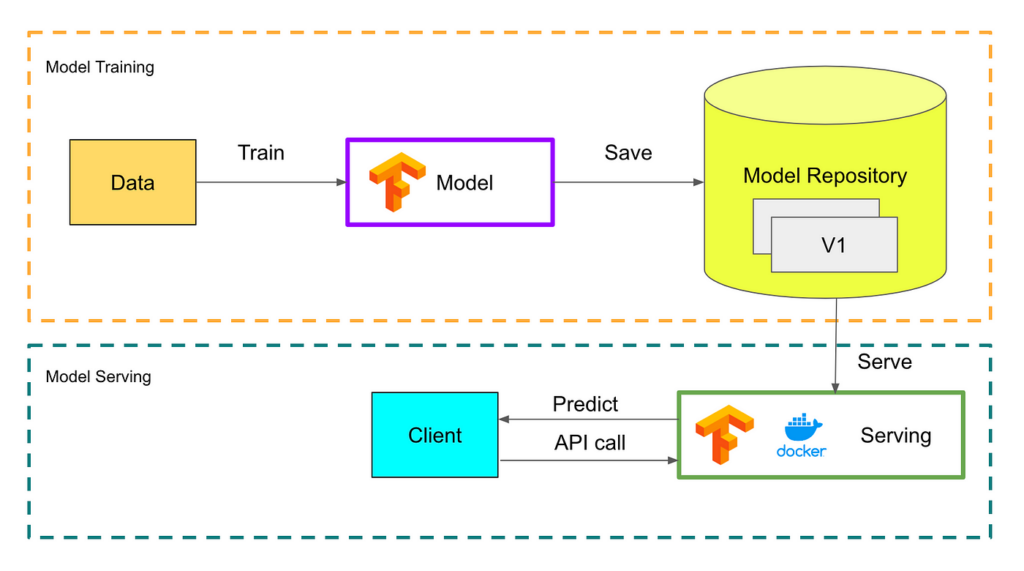
Building a machine learning API with TensorFlow Serving is a powerful way to deploy and serve machine learning models for real-time predictions. TensorFlow Serving is an open-source serving system designed by Google for serving machine learning models in production environments. By developing a machine learning API with TensorFlow Serving, you can easily expose your trained models as web services that can be accessed by other applications over HTTP. This enables seamless integration of machine learning capabilities into various software systems, making it a valuable tool for developers working with APIs and web services. In this guide, we will explore how to build a machine learning API using TensorFlow Serving, focusing on best practices and considerations for developing scalable and reliable APIs in the context of APIs & Web Services.
Understanding TensorFlow Serving
TensorFlow Serving is an easy-to-use framework for serving machine learning models in production environments. It provides flexible, high-performance serving of machine learning models designed to be deployed in production. With TensorFlow Serving, you can manage a variety of models, handle versioning, and efficiently serve predictions.
Prerequisites for Building a Machine Learning API
Before diving into the creation of a machine learning API using TensorFlow Serving, ensure that you have the following prerequisites:
- Basic Understanding of Machine Learning: Familiarity with machine learning concepts is crucial.
- Python Knowledge: You should be comfortable with Python programming.
- Docker: Knowing how to use Docker would greatly simplify the deployment process.
- TensorFlow Installed: Ensure you have TensorFlow installed on your system.
Step 1: Train Your Machine Learning Model
The first step in building a machine learning API is to create and train your model. Here’s how to train a simple model using TensorFlow.
import tensorflow as tf
from tensorflow import keras
from sklearn.datasets import load_iris
from sklearn.model_selection import train_test_split

# Load dataset
iris = load_iris()
X = iris.data
y = iris.target

# Split dataset into training and testing
X_train, X_test, y_train, y_test = train_test_split(X, y, test_size=0.2)

# Create a simple neural network model
model = keras.Sequential([
    keras.layers.Dense(10, activation='relu', input_shape=(X_train.shape[1],)),
    keras.layers.Dense(3, activation='softmax')
])

# Compile the model
model.compile(optimizer='adam', loss='sparse_categorical_crossentropy', metrics=['accuracy'])

# Train the model
model.fit(X_train, y_train, epochs=50)
Step 2: Save the Trained Model
Once your model is trained, you need to save it in a format that TensorFlow Serving can understand. This is done using the SavedModel format.
model.save("my_model")This command creates a directory called my_model containing the model architecture, weights, and training configuration.
Step 3: Set Up TensorFlow Serving Docker Container
The next step is to set up TensorFlow Serving using Docker. Docker provides an isolated environment that will simplify the deployment process.
docker pull tensorflow/servingAfter pulling the container, you can run the TensorFlow Serving instance by executing the following command:
docker run -p 8501:8501 --name=tf_model_serving --mount type=bind,source=$(pwd)/my_model,target=/models/my_model -e MODEL_NAME=my_model -t tensorflow/servingStep 4: Make Predictions via the API
After your container is up and running, you can now interact with your model using HTTP requests. TensorFlow Serving provides a RESTful API to facilitate this.
Using curl, you can send a prediction request:
curl -d '{"signature_name": "serving_default", "instances": [[5.1, 3.5, 1.4, 0.2]]}'
-H "Content-Type: application/json"
-X POST http://localhost:8501/v1/models/my_model:predict
This command sends a request to the TensorFlow Serving REST API and returns the model’s predictions.
Step 5: Validate Responses
When you send a prediction request to the API, you will receive a JSON response containing the predicted class. The result will look something like this:
{
  "predictions": [1]
}
This indicates that the model predicts the class for the provided input as 1.
Implementing a Basic Client for Prediction
To simplify sending requests and handling responses, you can implement a basic client in Python using the requests library.
import requests
import json

url = "http://localhost:8501/v1/models/my_model:predict"
data = json.dumps({"signature_name": "serving_default", "instances": [[5.1, 3.5, 1.4, 0.2]]})

headers = {"content-type": "application/json"}
response = requests.post(url, data=data, headers=headers)
print(response.json())
Step 6: Monitoring and Scaling Your Model
As your machine learning model serves requests in production, maintaining performance and monitoring its health are crucial. TensorFlow Serving provides support for various monitoring solutions.
You can use Prometheus to collect metrics and monitor the TensorFlow Serving instance. Make sure to enable the monitoring endpoint by adding the following option when you run the Docker container:
--monitoring_config /path/to/monitoring_config.yamlThis configuration can be used to scrape metrics, which will help you assess your model’s performance and identify any issues.
Versioning Your Machine Learning Model
One of the key features of TensorFlow Serving is the ability to manage multiple versions of your model. You can save different versions of your model by using the following command:
model.save("/models/my_model/1")You can then load this model with TensorFlow Serving by specifying the model version in your Docker run command.
Conclusion
By following the above steps, you can successfully build a machine learning API using TensorFlow Serving. From training your model to handling predictions over a REST API, TensorFlow Serving provides a robust framework for deploying machine learning models into production!
Building a Machine Learning API with TensorFlow Serving enables easy deployment and scalable serving of machine learning models, allowing seamless integration with other applications through standard HTTP requests. This provides a flexible and efficient solution for incorporating powerful machine learning capabilities into web services, allowing for quick and reliable access to predictive models.
Related posts:
 What Are APIs and How Do They Work?
 How to Secure Your API with JWT
 Building a Microservices Architecture with APIs
What Are API Keys and How to Use Them Securely?
Building a Microservices Architecture with APIs
What Are API Keys and How to Use Them Securely?
 A Beginner’s Guide to API Monetization
 Using Google Maps API for Location-Based Applications
 How to Handle API Authentication in Mobile Apps
The Importance of API Caching and How to Implement It
How to Handle API Authentication in Mobile Apps
The Importance of API Caching and How to Implement It
 Building a Weather App Using OpenWeather API
 How to Use AI-Powered APIs for Your Applications
 API Gateway vs Load Balancer: Understanding the Differences
How to Set Up API Rate Limiting in Nginx
API Gateway vs Load Balancer: Understanding the Differences
How to Set Up API Rate Limiting in Nginx
 How to Optimize API Response Time for Better Performance
Best API Security Practices to Prevent Attacks
How to Optimize API Response Time for Better Performance
Best API Security Practices to Prevent Attacks