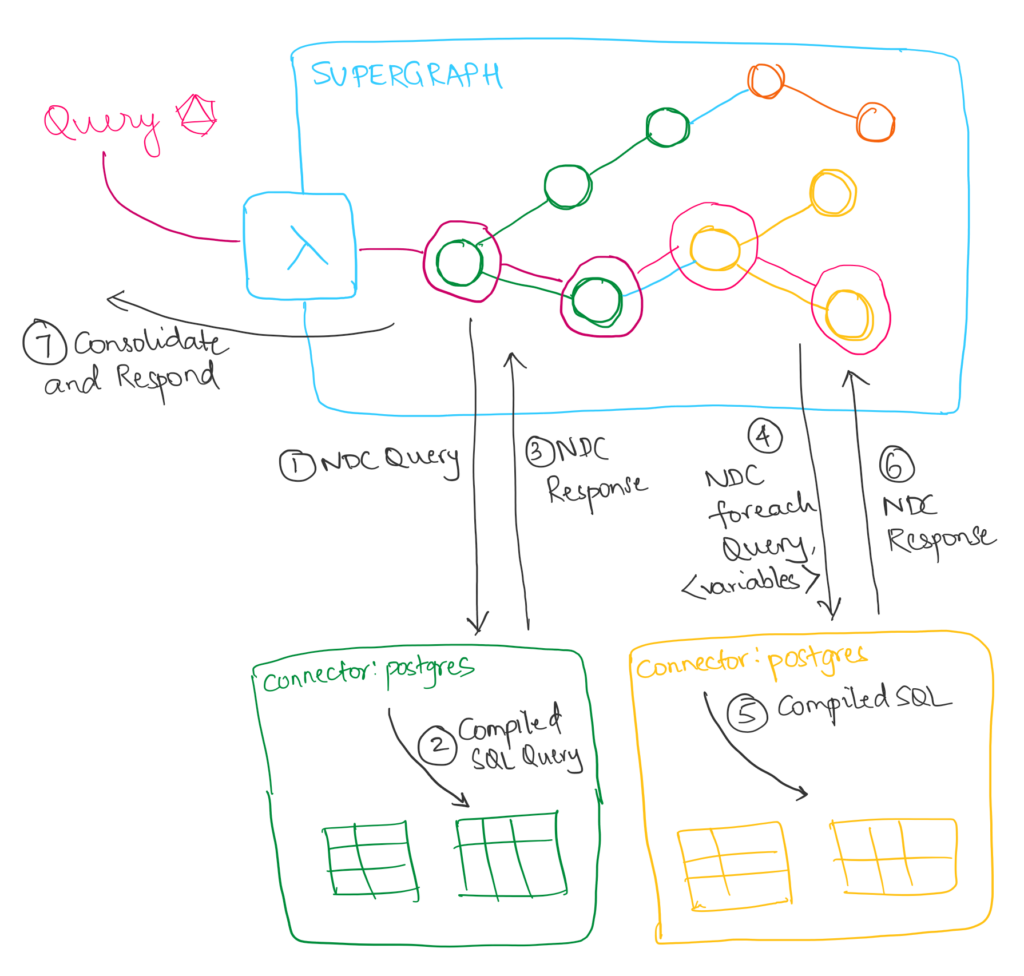
Optimizing API queries is crucial for enhancing the performance and efficiency of web services. GraphQL Dataloader is a powerful tool that allows developers to significantly improve the performance of their API queries by efficiently batching and caching data requests. By leveraging GraphQL Dataloader, developers can avoid over-fetching and under-fetching data, reduce the number of network requests, and enhance the overall speed and responsiveness of their applications. In this article, we will delve into the benefits of using GraphQL Dataloader for optimizing API queries, providing insights and best practices for maximizing the efficiency of API calls in web services.
In the world of APIs and Web Services, the efficiency of data retrieval is critical to the performance and scalability of your applications. One of the most efficient ways to manage data fetching in a GraphQL API is by using the GraphQL Dataloader. This powerful tool helps to optimize the execution of data fetching, minimizing the number of requests made to the server and improving the overall speed of your application.
Understanding GraphQL Dataloader
GraphQL Dataloader is a library developed by Facebook, designed to solve the problem of “N+1 queries”. When you request data in a typical GraphQL application, you may end up making multiple requests for your data, especially when dealing with relationships. Dataloader aims to batch these requests and cache results, which dramatically reduces the number of calls made to the database.
Installation of GraphQL Dataloader
Before diving into optimization strategies, you need to install Dataloader. You can do this easily using npm or yarn:
npm install dataloaderor
yarn add dataloaderBasic Implementation of Dataloader
After installing Dataloader, you can create a simple data loader for your GraphQL API. Here is a basic implementation:
const DataLoader = require('dataloader');

// A function to batch-fetch users from the database
const batchGetUsers = async (userIds) => {
    const users = await User.find({ id: { $in: userIds } });
    const userMap = new Map(users.map(user => [user.id, user]));
    return userIds.map(id => userMap.get(id));
};

// Creating a new instance of Dataloader
const userLoader = new DataLoader(batchGetUsers);
In this example, the batchGetUsers function takes an array of user IDs, fetches the users from the database in a single query, and returns the users in the same order that the IDs were received.
Best Practices for Optimizing API Queries with Dataloader
1. Batch Your Requests
One of the most significant advantages of using Dataloader is its ability to batch multiple requests into a single call. When designing your GraphQL schema, structure your API to facilitate this batching process. Ensure that when one query might lead to additional queries, such as fetching related entities, you use the Dataloader effectively.
2. Cache Results Appropriately
The caching mechanism in Dataloader allows you to prevent the same query from hitting the database multiple times during a request cycle. By caching the results of the queries, you can optimize subsequent requests and save valuable resources. Be mindful of cache lifetimes and when to clear them to avoid outdated data.
3. Use the Key Function Correctly
When you create a Dataloader, you need to define how the keys are generated. This key function is vital, as it directly impacts the batching process. Ensure it appropriately maps identifiers (like user IDs) to your fetched data. A well-defined key function ensures efficient use of Dataloader by grouping similar keys together.
const userLoader = new DataLoader(async (userIds) => {
    const users = await User.find({ id: { $in: userIds } });
    return userIds.map(id => users.find(user => user.id === id));
});
4. Avoid Overusing Dataloader
While Dataloader is a fantastic tool for optimizing API queries, overusing it can lead to unintended side effects like increased memory usage and complexity in code management. Use Dataloader for queries that are truly worth batching. If a query fetches a small or fixed set of data, it may be better to retrieve it directly rather than through Dataloader.
5. Nest Data Loaders for Nested Queries
For nested GraphQL queries, it is common to have multiple layers of Dataloader instances. Each resolver can have its own Dataloader, allowing you to efficiently handle queries that involve relationships. For instance, if a query fetches a user and their corresponding posts, you can create separate data loaders for users and posts:
const postLoader = new DataLoader(async (userIds) => {
    const posts = await Post.find({ userId: { $in: userIds } });
    return userIds.map(userId => posts.filter(post => post.userId === userId));
});
Integrating Dataloader in Your GraphQL Resolvers
Once you have configured Dataloader, the next step is integrating it into your GraphQL resolvers:
const resolvers = {
    Query: {
        user: (parent, { id }, { userLoader }) => userLoader.load(id),
    },
    User: {
        posts: (user) => postLoader.load(user.id),
    },
};
By integrating Dataloader in this manner, every time the user query type is called, it will batch load the users based on their IDs, ensuring efficiency and reduced database calls.
Handling Errors with Dataloader
Error handling is vital in any API, and the same applies to Dataloader. Ensure that any errors that arise during the batch processing are appropriately handled. You can catch errors within the batchGetUsers function and handle them gracefully, ensuring that the application continues to function without crashing:
const batchGetUsers = async (userIds) => {
    try {
        const users = await User.find({ id: { $in: userIds } });
        const userMap = new Map(users.map(user => [user.id, user]));
        return userIds.map(id => userMap.get(id));
    } catch (error) {
        console.error('Error fetching users:', error);
        return userIds.map(() => null); // or rethrow the error based on your needs
    }
};
Testing Your GraphQL API with Dataloader
When optimizing your API with Dataloader, it’s essential to conduct thorough testing. Use libraries like Jest or Mocha to create unit tests for your Dataloader implementations. Ensure you account for various scenarios, including:
- Fetching data with multiple keys
- Handling invalid keys
- Verifying cache behavior
By thoroughly testing your implementation, you’ll ensure that your API queries are optimized and robust against potential failures.
Conclusion: Embracing Efficiency with Dataloader
In a landscape where efficiency, speed, and responsiveness are paramount, implementing GraphQL Dataloader in your API queries can provide significant benefits. By adhering to the best practices outlined above, creating an optimized application becomes much more attainable, paving the way for a seamless user experience.
Utilizing GraphQL Dataloader can significantly enhance the efficiency and performance of API queries by efficiently batching and caching data fetching requests. This optimization technique helps reduce the number of network calls and improves overall query speeds, providing a more streamlined and responsive experience for users interacting with web services via APIs.
Related posts:
 How to Build an API with Hapi.js in Node.js
 How to Use AI-Based API Analytics for Performance Monitoring
 How to Optimize API Response Times with Lazy Loading
 How to Create a Blockchain API for Cryptocurrency Transactions
 How to Use AWS Cognito for API User Authentication
 How to Integrate the Telegram Bot API for Automated Messaging
 How to Implement an API Gateway for Serverless Applications
 What Is an API Consumer-Driven Contract and How to Use It?
 The Benefits of Using Server-Sent Events (SSE) in APIs
 How to Implement API Data Encryption with AES
 How to Implement API WebSockets with NestJS
 How to Implement API Response Caching with Varnish
 How to Use the Notion API for Task Management Automation
 How to Implement API Request Prioritization with Queues