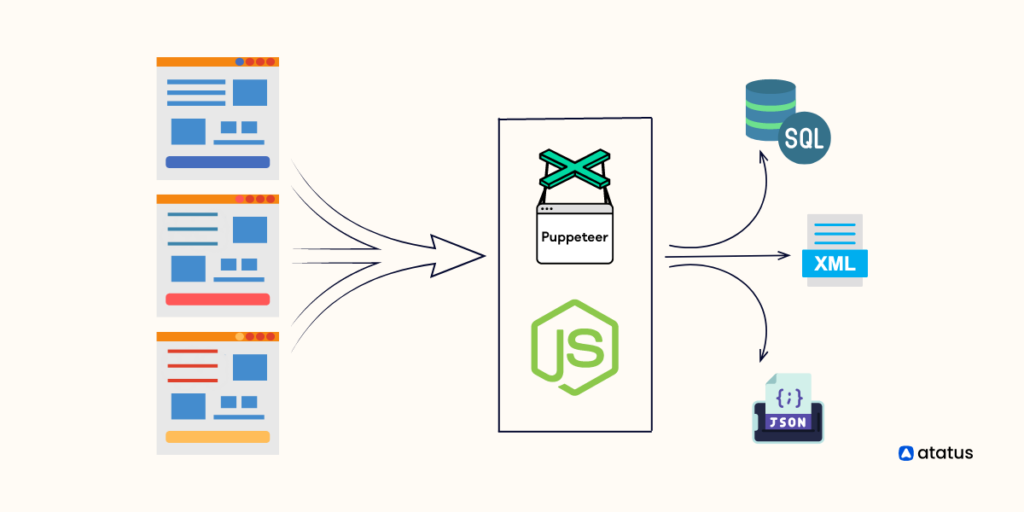
Web scraping is a powerful tool for extracting data from websites, but building a web scraping API can take the process to the next level. In this guide, we will explore how to build a web scraping API using Puppeteer, a headless browser tool, with a focus on APIs and Web Services. By leveraging Puppeteer to automate web scraping tasks, we can create a robust API that can fetch data from websites efficiently and reliably. Follow along to learn how to harness the power of Puppeteer to build your own web scraping API for your data retrieval needs.
What is Web Scraping?
Web scraping refers to the automated process of extracting data from websites. This is incredibly useful for developers and businesses looking to gather information from multiple sources without the time-consuming manual copying of data. Various web scraping libraries and frameworks exist, one of the most popular being Puppeteer.
Why Choose Puppeteer for Web Scraping?
Puppeteer is a Node.js library which provides a high-level API over the Chrome DevTools Protocol. It allows you to control headless Chrome or Chromium browsers, making it a powerful tool for web scraping. Here are some reasons to use Puppeteer:
- Headless Browser: Puppeteer runs Chromium in headless mode, meaning no GUI is present. This makes it faster and less resource-intensive.
- Simulates User Behavior: With Puppeteer, you can interact with page elements as if you were using a real browser, allowing for scraping data that requires user input.
- Highly Customizable: It allows for extensive customization to fit the needs of your project, including managing cookies, and intercepting network requests.
Setting Up Your Environment
To begin building your web scraping API, you need to set up your development environment. Follow these steps:
1. Install Node.js
Make sure to have Node.js (preferably version 14 or higher) installed on your system. You can download it from the official Node.js website.
2. Create a New Project
Navigate to your terminal or command prompt and run the following commands to create a new project:
mkdir web-scraping-api
cd web-scraping-api
npm init -y
3. Install Puppeteer
Install Puppeteer and other dependencies using npm from your terminal:
npm install puppeteer express corsBuilding the Web Scraping API
Now, let’s create a simple web scraping API using Express.js that leverages Puppeteer to scrape data.
1. Create the API Server
In the root of your project directory, create a new file named server.js. This file will house your server code:
const express = require('express');
const cors = require('cors');

const app = express();
const PORT = process.env.PORT || 3000;

app.use(cors());
app.use(express.json());

app.listen(PORT, () => {
    console.log(`Server is running on http://localhost:${PORT}`);
});
2. Implement the Scraping Logic
Add the scraping logic in your server.js file. We will create a route that takes a URL and scrapes data from the page:
const puppeteer = require('puppeteer');

app.post('/scrape', async (req, res) => {
    const { url } = req.body;
    if (!url) {
        return res.status(400).json({ error: 'URL is required' });
    }

    try {
        const browser = await puppeteer.launch();
        const page = await browser.newPage();
        await page.goto(url, { waitUntil: 'networkidle2' });

        // Example: scraping the title of the page
        const title = await page.title();

        await browser.close();
        res.json({ title });
    } catch (error) {
        res.status(500).json({ error: error.message });
    }
});
Testing the Web Scraping API
Now that you have set up the basic web scraping API, you can test it using an HTTP client like Postman or Insomnia.
1. Start the Server
In your terminal, run the following command to start the server:
node server.js2. Make a POST Request
Open Postman and create a new POST request to http://localhost:3000/scrape. In the body section, set the type to JSON, and input the following:
{
    "url": "https://example.com"
}
Hit the “Send” button, and you should receive a response with the title of the page specified in the URL.
Handling Errors Gracefully
It’s crucial to handle potential errors that may arise during the scraping process. Here are some enhancements you can implement:
1. URL Validation
Before proceeding with the scraping, validate the provided URL to check if it’s well-formed:
function isValidURL(string) {
    var res = string.match(/(https?://[^s]+)/g);
    return (res !== null);
}

if (!isValidURL(url)) {
    return res.status(400).json({ error: 'Invalid URL' });
}
2. Timeout and Retries
In some cases, loading a page may take longer than expected. You can implement a timeout feature or retry logic to ensure the scraping function is robust. Here’s an example of timeout handling:
await page.goto(url, { waitUntil: 'networkidle2', timeout: 60000 }); // 60 seconds timeoutScaling Your Application
As you build your web scraping API, consider how you can efficiently scale it. Here are some tips:
- Dockerization: Containerize your application using Docker for easier deployment and scaling.
- Implement Load Balancing: Use a load balancer to distribute requests efficiently across multiple instances of your application.
- Queue Management: Utilize a queue system like RabbitMQ or Redis to manage incoming requests and control the rate of scraping.
Conclusion
Building a web scraping API with Puppeteer allows developers to automate data extraction seamlessly. With careful considerations around error handling, performance, and scaling, you can create a powerful tool that yields valuable data insights. Leverage these techniques responsibly to comply with the terms of service of the websites you scrape, ensuring ethical scraping practices.
Utilizing Puppeteer to create a web scraping API offers a powerful solution to extract data from websites in a structured and automated manner. By integrating Puppeteer with an API framework, developers can easily build and deploy web scraping services that offer reliable and efficient data extraction capabilities. This approach enhances the accessibility and usability of web scraping tools, ultimately contributing to the advancement of APIs and web services in enabling streamlined data retrieval processes.
Related posts:
 How to Build a Headless CMS API with Strapi
 How to Use the Notion API for Task Management Automation
 What Is API Schema Validation and Why Is It Important?
 How to Use the OpenWeather API for Real-Time Air Quality Monitoring
 How to Build an API That Supports WebRTC for Live Video Calls
 How to Use the NASA API for Space Data Integration
 How to Implement API Access Management with OAuth Scopes
 How to Use the Notion API to Automate Project Management
 How to Implement API Request Prioritization with Queues
 How to Build an API That Supports Biometric Authentication
 How to Use the Peloton API for Home Workout Tracking
 How to Implement API Connection Pooling for Database Efficiency
 How to Implement Dynamic API Routing for Multi-Tenant Applications
 How to Use the Airbnb API for Vacation Rental Automation