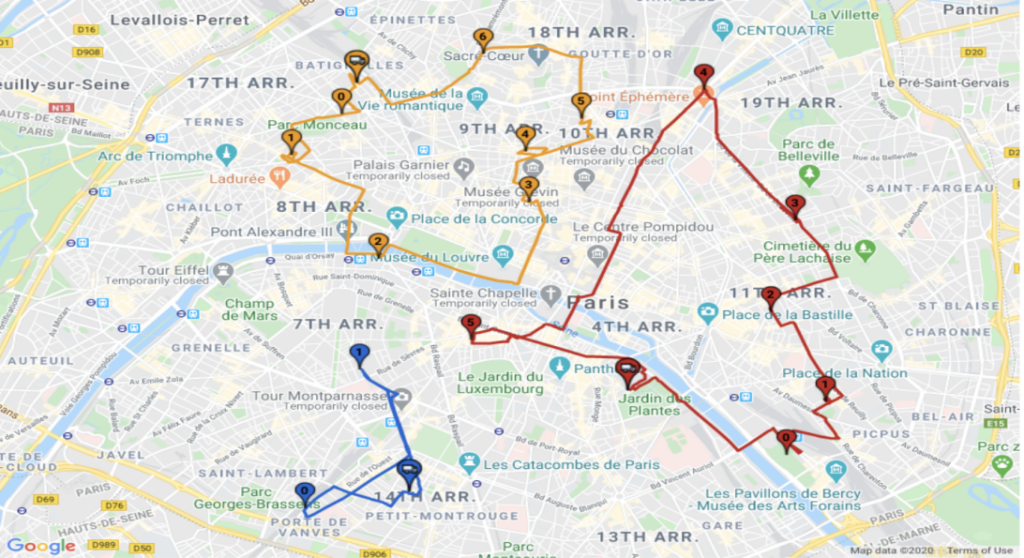
Integrating the Google Maps API for route optimization involves leveraging powerful APIs and web services to enhance the efficiency of location-based services. By tapping into the extensive functionality provided by the Google Maps API, developers can access features such as real-time traffic data, directions, and route optimization algorithms to create seamless navigation experiences for their users. Through the use of APIs and web services, businesses can streamline their logistics operations, improve delivery services, and enhance the overall user experience by optimizing routes based on various factors such as traffic conditions, distance, and time constraints. Embracing the capabilities of APIs and web services within the Google Maps ecosystem allows for the creation of sophisticated location-based solutions that drive innovation and efficiency in a wide range of industries.
Understanding Google Maps API
The Google Maps API is a powerful tool that enables developers to embed custom maps into their applications. This API allows users to access various functionalities such as distance calculations, real-time traffic updates, directions, and geocoding services. By integrating the Google Maps API, you can provide a seamless user experience and drastically improve your application’s route optimization capabilities.
Setting Up Your Google Maps API Account
Before diving into route optimization, you need to set up a Google Cloud Platform (GCP) account and enable the Google Maps API. Follow these steps:
- Create a Google Cloud Account: Visit the Google Cloud Platform and create a new project.
- Enable Billing: To use the Google Maps services, you must enable billing on your GCP account.
- Enable the Google Maps API: Navigate to the API Library, search for “Google Maps JavaScript API”, “Directions API”, and “Distance Matrix API”, and enable them.
- Obtain API Key: Generate an API key from the Credentials section, which will be used in your requests.
Implementing the Google Maps JavaScript API
Integrating the Google Maps JavaScript API involves including the API script in your HTML and initializing the map:
<script async deferred
    src="https://maps.googleapis.com/maps/api/js?key=YOUR_API_KEY"></script>
Replace YOUR_API_KEY with the API key you obtained earlier. The following code initializes a simple map:
<div id="map" style="height: 500px; width: 100%;"></div>

<script>
function initMap() {
    var location = {lat: -34.397, lng: 150.644};
    var map = new google.maps.Map(document.getElementById('map'), {
        zoom: 8,
        center: location
    });
}
</script>
Using Directions API for Route Optimization
The Directions API allows you to calculate directions between multiple locations, which is essential for route optimization. To get started:
Making a Directions API Request
To request directions, you can use a simple HTTP GET request:
https://maps.googleapis.com/maps/api/directions/json?origin=place_id:ChIJN1t_tDeuEmsRUcIaQYcC9m8&destination=place_id:ChIJL_zfXG6uEmsRZvcYgQkSNxA&key=YOUR_API_KEY
In this URL, replace origin and destination with the locations you want to optimize, and append your API_KEY.
Parsing the Response
The API response will include information such as routes, legs, and steps. Here’s how you can parse the response in JavaScript:
function calculateRoute() {
    var service = new google.maps.DirectionsService();
    var request = {
        origin: 'Your Origin',
        destination: 'Your Destination',
        travelMode: google.maps.TravelMode.DRIVING
    };

    service.route(request, function(result, status) {
        if (status == google.maps.DirectionsStatus.OK) {
            displayRoute(result);
        }
    });
}
Incorporating the Distance Matrix API
To further enhance route optimization, use the Distance Matrix API. This API provides travel distance and time for multiple origins and destinations.
Making a Distance Matrix API Request
A request can be sent as follows:
https://maps.googleapis.com/maps/api/distancematrix/json?origins=place_id:ChIJN1t_tDeuEmsRUcIaQYcC9m8|place_id:ChIJL_zfXG6uEmsRZvcYgQkSNxA&destinations=place_id:ChIJL_zfXG6uEmsRZvcYgQkSNxA|place_id:ChIJN1t_tDeuEmsRUcIaQYcC9m8&key=YOUR_API_KEY
In this request, you can specify multiple origins and destinations by separating them with a vertical bar (|).
Parsing Distance Matrix Response
The response provides an array of distances and durations for each pair of origin and destination:
function handleDistanceMatrix(result) {
    var origins = result.origin_addresses;
    var destinations = result.destination_addresses;

    for (var i = 0; i < origins.length; i++) {
        for (var j = 0; j < destinations.length; j++) {
            var distance = result.rows[i].elements[j].distance.text;
            var duration = result.rows[i].elements[j].duration.text;
            console.log('Distance from ' + origins[i] + ' to ' + destinations[j] + ': ' + distance + ' in ' + duration);
        }
    }
}
Optimizing Routes with Multiple Waypoints
To optimize routes with multiple waypoints, you can utilize the waypoints parameter in your Directions API request:
var request = {
    origin: 'Your Origin',
    destination: 'Your Destination',
    waypoints: [
        { location: 'Waypoint 1', stopover: true },
        { location: 'Waypoint 2', stopover: true }
    ],
    travelMode: google.maps.TravelMode.DRIVING
};
This structure allows for the inclusion of intermediate stops along the route, providing a comprehensive optimization solution.
Handling API Limits and Quotas
Google Maps API has usage limits and quotas that you should consider during integration. These limits can affect your app’s functionality:
- Quota Limits: Monitor the number of requests in the Google Cloud Console.
- API Key Restriction: Apply restrictions to your API keys to prevent unauthorized use.
- Error Handling: Implement error handling to gracefully respond when a limit is reached.
Best Practices for Route Optimization
- Optimize API Calls: Avoid redundant API calls by caching results.
- Use Batch Requests: For multiple locations, consider batch processing to minimize API calls.
- Provide User Feedback: Use loading indicators and results handling to improve user experience.
Conclusion
Integrating Google Maps API for route optimization can significantly enhance your application’s functionality. By utilizing the Directions API and Distance Matrix API effectively, you can provide optimal routing solutions while improving user experiences. Always stay updated with best practices and monitor your usage to ensure optimal performance.
Integrating Google Maps API for route optimization provides a powerful solution for businesses looking to enhance efficiency and productivity. By leveraging the API’s capabilities, developers can access real-time traffic data, multiple route options, and customizable parameters to create optimized routes tailored to specific needs. This integration not only improves navigation but also saves time and resources, ultimately leading to a more streamlined and effective operations.
Related posts:
 What Are APIs and How Do They Work?
 How to Secure Your API with JWT
 Building a Microservices Architecture with APIs
What Are API Keys and How to Use Them Securely?
Building a Microservices Architecture with APIs
What Are API Keys and How to Use Them Securely?
 A Beginner’s Guide to API Monetization
 Using Google Maps API for Location-Based Applications
 How to Handle API Authentication in Mobile Apps
The Importance of API Caching and How to Implement It
How to Handle API Authentication in Mobile Apps
The Importance of API Caching and How to Implement It
 Building a Weather App Using OpenWeather API
 How to Use AI-Powered APIs for Your Applications
 API Gateway vs Load Balancer: Understanding the Differences
How to Set Up API Rate Limiting in Nginx
API Gateway vs Load Balancer: Understanding the Differences
How to Set Up API Rate Limiting in Nginx
 How to Optimize API Response Time for Better Performance
Best API Security Practices to Prevent Attacks
How to Optimize API Response Time for Better Performance
Best API Security Practices to Prevent Attacks