Setting up API testing automation using Cypress can provide a powerful and efficient way to test the functionality, reliability, and performance of APIs and web services. Cypress, known for its simplicity and ease of use, offers a comprehensive framework for creating automated API tests with JavaScript. By leveraging Cypress’s rich set of features and capabilities, developers can easily write and execute API test scripts, validate responses, and generate detailed test reports. This guide will walk you through the steps to set up API testing automation using Cypress, allowing you to streamline your testing process and ensure the quality of your APIs and web services.
Understanding API Testing
API (Application Programming Interface) testing is crucial in ensuring that your web services are functioning as intended. Unlike traditional UI testing, API testing focuses on the business logic layer of the software architecture. It checks the endpoints for response status, data validity, and performance benchmarks. Properly testing APIs enhances the reliability and security of your application.
Why Choose Cypress for API Testing?
Cypress is primarily known for end-to-end testing of web applications, but it also provides robust capabilities for API testing. Some benefits of using Cypress for API testing include:
- Real-time reloads: Cypress automatically refreshes when changes are made, making it versatile for testing.
- Easy-to-install: With just a few commands, Cypress can be integrated into your project.
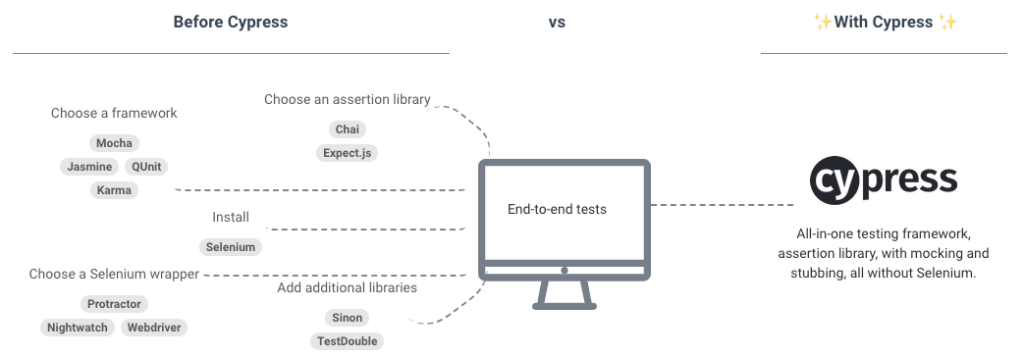
- All-in-one testing environment: Cypress allows you to run both UI tests and API tests within a single framework.
- Clear and readable syntax: Cypress uses JavaScript, making it accessible for developers and testers.
Setting Up Your Environment
To start automating your API tests with Cypress, follow these steps:
1. Install Cypress
First, we need to set up Cypress in your environment. You can do this using npm. Open your terminal and navigate to your project directory, then run:
npm install cypress --save-devThis command installs Cypress as a development dependency.
2. Open Cypress
After installation, you can open Cypress with the following command:
npx cypress openThis will launch the Cypress Test Runner, where you can see pre-existing examples and create new tests.
3. Directory Structure
After running npx cypress open, Cypress creates a new cypress folder with the following structure:
- fixtures: Store static data for testing.
- integration: Place your test files here.
- plugins: Add custom functionalities or modify existing ones.
- support: This folder contains utilities and functions that can be reused across tests.
Writing Your First API Test
Now that you have set up Cypress, it’s time to write your first API test. Let’s assume you are testing a fictional JSONPlaceholder API, which is a free online REST API for testing and prototyping.
1. Create a New Test File
Navigate to the cypress/integration folder and create a new file, e.g., api_tests.spec.js.
2. Writing the Test Code
Open your newly created file and write the following example:
describe('API Testing with Cypress', () => {
    it('GET - Read users', () => {
        cy.request('https://jsonplaceholder.typicode.com/users')
            .its('status')
            .should('equal', 200);
    });

    it('POST - Create a new user', () => {
        cy.request({
            method: 'POST',
            url: 'https://jsonplaceholder.typicode.com/users',
            body: {
                name: 'John Doe',
                username: 'johndoe',
                email: 'johndoe@example.com'
            }
        }).then((response) => {
            expect(response.status).to.eq(201);
            expect(response.body).to.have.property('name', 'John Doe');
        });
    });
});
3. Test Explanation
The above example contains two basic tests:
- GET – Read users: This test sends a GET request to read users, checking that the response status is 200 (OK).
- POST – Create a new user: This test creates a new user with JSON data and checks both the status of the response to be 201 (Created) and verifies the returned data.
Testing Different HTTP Methods
You can extend your API testing coverage by testing various HTTP methods including PUT, DELETE, and PATCH. Below are examples for these methods:
PUT – Update an existing user
it('PUT - Update user details', () => {
    cy.request({
        method: 'PUT',
        url: 'https://jsonplaceholder.typicode.com/users/1',
        body: {
            name: 'John Updated'
        }
    }).then((response) => {
        expect(response.status).to.eq(200);
        expect(response.body).to.have.property('name', 'John Updated');
    });
});
DELETE – Remove a user
it('DELETE - Remove a user', () => {
    cy.request({
        method: 'DELETE',
        url: 'https://jsonplaceholder.typicode.com/users/1'
    }).then((response) => {
        expect(response.status).to.eq(204);
    });
});
Handling Authentication in API Tests
When testing APIs that require authentication, you may need to include authorization tokens. Here’s how you can handle that with Cypress:
Example with Bearer Token
it('GET - Authenticated User', () => {
    const token = 'your_auth_token';

    cy.request({
        method: 'GET',
        url: 'https://your-api.com/protected',
        headers: {
            'Authorization': `Bearer ${token}`
        }
    }).then((response) => {
        expect(response.status).to.eq(200);
    });
});
Writing Assertions
Cypress provides various methods for performing assertions on your API responses. Here’s how you can improve the quality of your assertions:
Inspecting Response Bodies
it('GET - Inspect User Properties', () => {
    cy.request('https://jsonplaceholder.typicode.com/users/1')
        .its('body')
        .should('have.property', 'id', 1)
        .and('have.property', 'username');
});
Organizing Tests with Fixtures
Using fixtures helps you manage data better. You can create a JSON file in cypress/fixtures and use it in your tests.
Using Fixture Data
it('POST - Create user with fixture data', () => {
    cy.fixture('user').then((userData) => {
        cy.request('POST', 'https://jsonplaceholder.typicode.com/users', userData)
            .its('status')
            .should('equal', 201);
    });
});
Running Tests in Continuous Integration (CI) Pipelines
Integrating your Cypress tests into your CI/CD pipelines ensures that API tests are run automatically with each code change. You can use platforms like GitHub Actions, Travis CI, or Jenkins. Below is a simple example for GitHub Actions:
name: Cypress Tests
on: [push]
jobs:
  cypress-run:
    runs-on: ubuntu-latest
    steps:
      - name: Checkout Code
        uses: actions/checkout@v2
      - name: Install dependencies
        run: npm install
      - name: Run Cypress Tests
        run: npx cypress run
Best Practices for API Testing with Cypress
- Use clear naming conventions for test cases to maintain readability.
- Organize tests based on functionality or APIs to enhance maintainability.
- Mock API responses to isolate tests from back-end dependencies where necessary.
- Run tests regularly to catch issues early in the development lifecycle.
Debugging Failed Tests
When tests fail, debugging can be a challenge. Cypress provides powerful debugging tools. You can add debugger statements or utilize the cy.pause() command to halt execution for inspection.
it('GET - Debugging Example', () => {
    cy.request('https://jsonplaceholder.typicode.com/users/1')
        .then((response) => {
            debugger; // Open DevTools to inspect response
            expect(response.status).to.eq(200);
        });
});
Conclusion of API Testing Automation with Cypress
By following the above steps and best practices, you can efficiently set up and execute API testing automation using Cypress. This approach not only enhances the reliability of your web services but also streamlines development processes, ensuring your applications perform optimally in production. Incorporate these techniques into your testing strategy to deliver high-quality software reliably.
Setting up API testing automation using Cypress offers a powerful and efficient way to ensure the reliability and performance of APIs and web services. By leveraging Cypress’s user-friendly syntax and robust testing capabilities, developers can efficiently create and execute automated API tests, thereby enhancing the overall quality and effectiveness of their software applications. By following best practices and incorporating Cypress into their testing workflows, developers can streamline the testing process, accelerate development cycles, and deliver high-quality APIs and web services to their users.
Related posts:
 What Are APIs and How Do They Work?
 How to Secure Your API with JWT
 Building a Microservices Architecture with APIs
What Are API Keys and How to Use Them Securely?
Building a Microservices Architecture with APIs
What Are API Keys and How to Use Them Securely?
 A Beginner’s Guide to API Monetization
 Using Google Maps API for Location-Based Applications
 How to Handle API Authentication in Mobile Apps
The Importance of API Caching and How to Implement It
How to Handle API Authentication in Mobile Apps
The Importance of API Caching and How to Implement It
 Building a Weather App Using OpenWeather API
 How to Use AI-Powered APIs for Your Applications
 API Gateway vs Load Balancer: Understanding the Differences
How to Set Up API Rate Limiting in Nginx
API Gateway vs Load Balancer: Understanding the Differences
How to Set Up API Rate Limiting in Nginx
 How to Optimize API Response Time for Better Performance
Best API Security Practices to Prevent Attacks
How to Optimize API Response Time for Better Performance
Best API Security Practices to Prevent Attacks