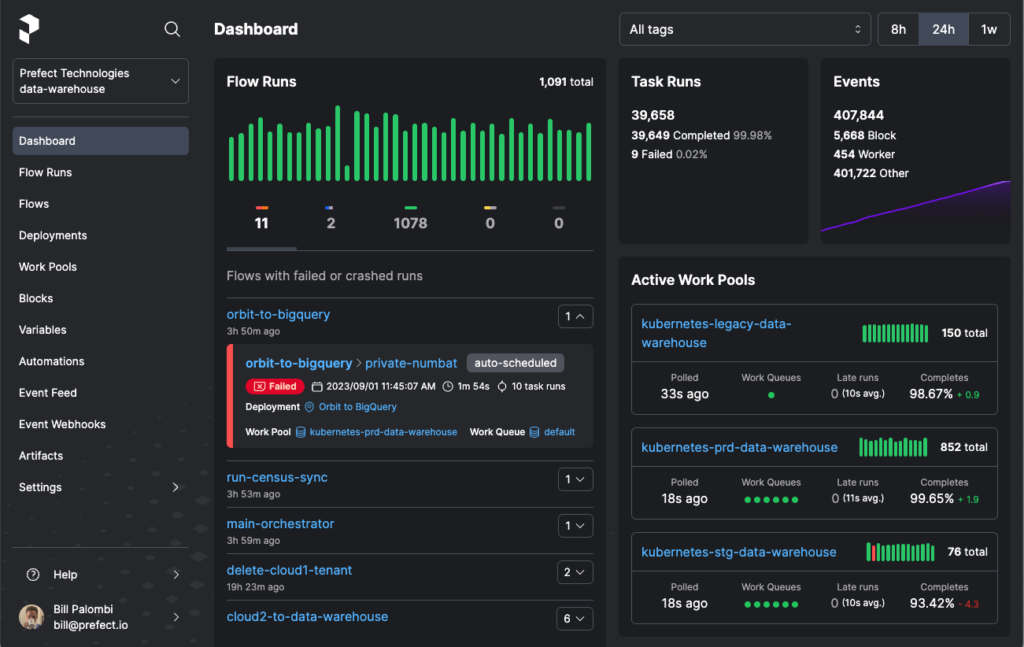
In the realm of Big Data analytics, managing complex workflows and orchestrating data pipelines efficiently is crucial for achieving optimal performance and scalability. Prefect, a modern workflow automation tool, offers a robust solution tailored specifically for Big Data processing tasks. By providing a simple yet powerful interface, Prefect enables data engineers and analysts to design, schedule, and monitor workflows seamlessly, allowing for streamlined execution and monitoring of data pipelines in any Big Data environment. In this article, we will explore how to leverage Prefect for workflow automation in Big Data applications, highlighting its key features and benefits for enhancing productivity and reliability in data processing workflows.
In the era of Big Data, organizations are increasingly relying on robust tools that can help manage and automate complex workflows. One such tool that has gained popularity is Prefect. Prefect provides a powerful platform for orchestrating data workflows, making it easier for data engineers and data scientists to build and manage data processes. This guide outlines the steps to effectively use Prefect for workflow automation in Big Data environments.
What is Prefect?
Prefect is an open-source workflow management system designed for the modern data stack. It simplifies the process of building, running, and monitoring data pipelines, enabling users to focus on data quality and results instead of boilerplate code. Prefect uses a directed acyclic graph (DAG) structure to manage workflows, providing a visual representation of tasks and their dependencies. This structure makes it easy to track progress and ensure that workflows are executed in the correct order.
Key Features of Prefect
- Task and Flow Orchestration: Prefect allows users to define tasks that perform specific actions and flows that represent a sequence of tasks.
- Dynamic Workflows: Users can create workflows that adapt at runtime, allowing for better resource utilization.
- State Management: Prefect provides robust state handling to track the execution state of tasks, offering immediate insight into any failures or retries.
- Scalability: Prefect can scale to accommodate varying workloads, making it suitable for both small and large data operations.
- Cloud Integration: Prefect seamlessly integrates with cloud services, enhancing its capabilities in a Big Data environment.
Setting Up Prefect for Workflow Automation
Step 1: Installation
To start using Prefect, you need to install it. You can install Prefect using pip, a powerful package manager for Python. Open your terminal and run the following command:
pip install prefectStep 2: Creating a Prefect Project
After installation, the next step is to create a new Prefect project. You can do this by running:
prefect create project "My Big Data Project"Step 3: Defining Tasks
In Prefect, a task represents a single operation in your workflow. Define a task using the @task decorator provided by Prefect. Below is an example of defining a simple task:
from prefect import task

@task
def extract_data():
    # Logic for data extraction
    return data
Step 4: Creating Flows
Once you have defined your tasks, you can create a flow that orchestrates these tasks. A flow is a collection of tasks, and you can define dependencies between tasks. For instance:
from prefect import Flow

with Flow("ETL Flow") as flow:
    data = extract_data()
    transformed_data = transform_data(data)
    load_data(transformed_data)
Step 5: Running the Flow
To execute your defined flow, you can run:
flow.run()Using the Prefect Cloud or a local Prefect server can facilitate more efficient execution and monitoring of flows.
Integrating Prefect with Big Data Tools
Prefect is designed to work with a variety of Big Data tools and platforms. Integrating these tools allows for enhanced data processing and analysis capabilities. Here are some popular integrations:
Integration with Apache Spark
Apache Spark is a powerful big data processing framework, and Prefect seamlessly integrates with it. You can define tasks that leverage the capabilities of Spark by utilizing the pyspark library. Here’s an example:
from prefect import task
from pyspark.sql import SparkSession

@task
def spark_task():
    spark = SparkSession.builder.appName("MySparkApp").getOrCreate()
    df = spark.read.csv("data.csv")
    # Perform Spark operations
    df.show()
Integration with Dask
Dask is another powerful tool for parallel computing with Big Data. You can use Prefect to orchestrate Dask tasks effectively:
from prefect import task
import dask.dataframe as dd

@task
def dask_task():
    df = dd.read_csv("data/*.csv")
    result = df.groupby('column_name').sum().compute()
    return result
Integration with Cloud Platforms
Many organizations use cloud services for their big data processing. Prefect integrates well with platforms like Google Cloud Platform (GCP), AWS, and Azure. By utilizing Prefect’s capabilities along with cloud services, you can scale your data workflows significantly.
Monitoring and Logging with Prefect
One of the standout features of Prefect is its monitoring and logging capabilities. You can monitor the execution of your flows and tasks in real-time, gaining insights into performance and issues.
Using the Prefect UI
Prefect provides a user-friendly UI that allows you to visualize your workflows and their states. You can see which tasks have succeeded, failed, or are currently running, further equipping you to handle discrepancies effectively.
Custom Notifications
Set up custom notifications to alert you of task failures or unexpected behaviors. Prefect supports integrations with services such as Slack, Email, and more, allowing you to define event-driven notifications:
from prefect import task

@task
def notify_failure(context):
    # Logic to send notifications
    pass
Managing State and Retries in Prefect
Prefect offers built-in state management, allowing you to define how each task behaves in different scenarios, such as failures or timeouts. You can configure retries for tasks, ensuring robustness in your workflows. Here’s how you can implement retries:
from prefect import task, Task

@task(max_retries=3, retry_delay=timedelta(seconds=10))
def resilient_task():
    # Task logic that may fail
    pass
Testing Prefect Workflows
It’s crucial to ensure that your workflows are functioning as expected before deploying them in production. Prefect supports testing workflows using traditional unit testing frameworks. You can isolate tasks and flows for testing by mocking dependencies:
from prefect import Flow

def test_my_flow():
    with Flow("test-flow") as flow:
        # Define test flow
        pass
    state = flow.run()
    assert state.is_succeeded()
Best Practices for Using Prefect in Big Data
- Modular Tasks: Break down workflows into smaller, modular tasks for easier testing and maintenance.
- Version Control: Maintain version control for your workflows to track changes and facilitate rollback when necessary.
- Documentation: Document your workflows and tasks to enhance team collaboration and knowledge sharing.
- Regular Monitoring: Establish monitoring routines to ensure workflows function correctly over time and to catch issues early.
By following these practices, you can enhance the efficiency and effectiveness of your Big Data workflows using Prefect.
Prefect offers a powerful and user-friendly solution for automating and orchestrating complex workflows in the realm of Big Data. By utilizing Prefect’s features and capabilities, organizations can streamline their data processing tasks, improve efficiency, and ultimately unlock the full potential of their Big Data initiatives.
Related posts:
 Natural Language Processing (NLP) with Big Data
 How to Perform Large-Scale Data Labeling for AI Models
 How to Implement Near Real-Time Analytics in Big Data
 How to Implement AutoML for Big Data Analytics
 The Importance of Explainable AI (XAI) in Big Data Models
 How to Use IBM Cloud for Big Data Solutions
 The Importance of Fairness and Bias Detection in Big Data Models
 How to Perform Large-Scale Time Series Forecasting with Big Data
 The Future of AI-Powered Data Wrangling for Big Data Scientists
 The Future of Generalized Zero-Shot Learning for Big Data AI Models
 How to Use Vector Search for Scalable AI-Powered Recommendations
 The Future of Low-Code AI Tools in Big Data Model Development
 The Future of Automated Data Engineering with AI-Driven Pipelines
 How to Perform Large-Scale Variational Inference on Streaming Data